.svg)
Blog Gallery
Build lifelong relationships
Latest stories, guides, and benchmarks from the world of alumni relations, fundraising, donor engagement, advancement services, events, and higher-education philanthropy
For a long time, alumni engagement revolved around a handful of big dates on the calendar. Homecoming, reunions, a gala, and a giving day did most of the heavy lifting, and the months in between remained quiet.
The 2026 National Alumni Survey found that 86% of alumni are satisfied with their overall experience as a student, but only 50% feel the same way about their experience as an alum. Alumni still value their time at the institution, but what many of them are missing is a relationship that carries on after they leave campus.
This is why more advancement teams are trying to stay connected with alumni throughout the year, instead of only around a few key moments. But what does year-round engagement actually look like across advancement teams today? Which programs are teams running, what's getting in the way, and how are they using data, technology, and AI to keep up?
To find out, we surveyed 103 advancement professionals across roughly 90 institutions for our research report, The State of Year-Round Alumni Engagement (2026). Most respondents were based in the US, and we also heard from teams in Canada and the UK. They came from a wide mix of organizations, from solo shops to teams of over 100 people, and from K-12 offices to large public universities.
Since the survey was opt-in, the findings work best as a reference point for spotting patterns across the field. This blog will give you five that stood out the most from the report and what they could mean for your team.
1. Alumni engagement is moving beyond flagship events
Signature events still matter: A reunion or homecoming can create a moment alumni remember for years, but for most teams, those events no longer make up the entire engagement strategy.
When we asked respondents to describe their approach, only 8% said their engagement is mostly event-led. Here's how the rest of the answers broke down:
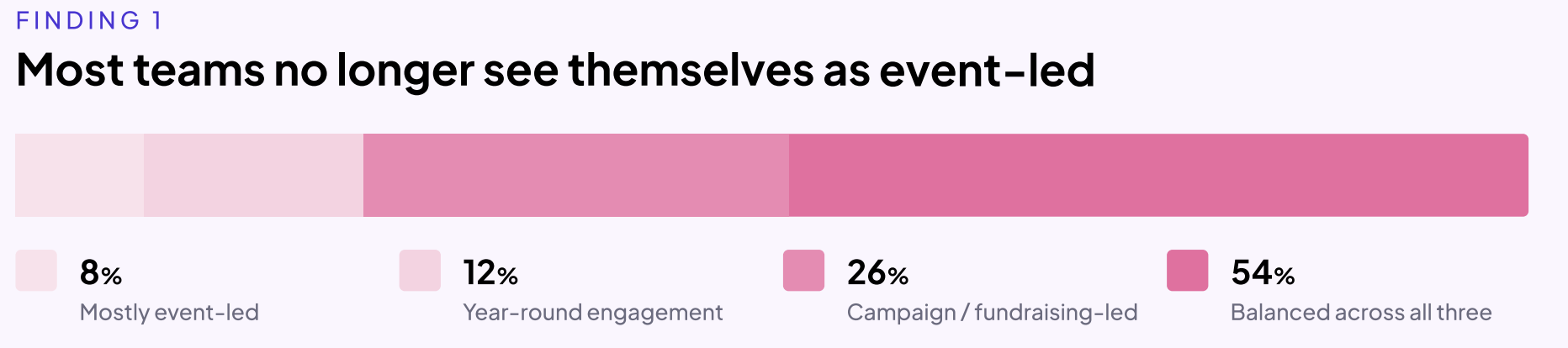
Teams are building portfolios of smaller touchpoints instead of relying on one flagship program. The most common year-round initiatives in the report were:
- Volunteer opportunities (57%)
- Career networking (48%)
- Alumni storytelling and user-generated content (48%)
- Parent and family engagement (45%)
- Affinity groups (40%)
Class notes, regional communities, mentorship programs, and young alumni programs followed close behind.
What this shift means for advancement teams
As the report points out, every event sorts your alumni into two groups: the ones who can show up and the ones who can't. An alum who lives far away or is raising a young family may want to stay involved but simply can't make it to campus. A broader portfolio gives them a way in.
It also helps alumni feel more connected. The 2026 National Alumni Survey found that alumni who recently volunteered with their alma mater are 8 times more likely to feel very connected and 5 times more likely to feel very informed than those who never have.
That said, more programs don't automatically lead to better engagement. When we asked which initiatives had been most successful for sustained engagement, volunteer opportunities came out on top (34%), followed by affinity groups and regional communities (27% each). Mentorship, on the other hand, came up most often as the hardest program to keep alive.
So before you add another program to the calendar, the report suggests running each one through three questions:
- Does it create meaningful value for alumni?
- Can we sustain it with our current resources?
- Should we expand it, redesign it, or retire it?
Punahou School in Honolulu, for example, used the six-month gap between its February carnival and June alumni luau to plan a multi-year events calendar. You can read how it worked in the full report.
2. Capacity is the biggest barrier to going year-round
Coming up with new engagement ideas is the easy bit for most teams. Keeping those ideas running year after year is where the challenge is.
Limited staff capacity was the most cited barrier in the survey, followed by low alumni participation and budget constraints:
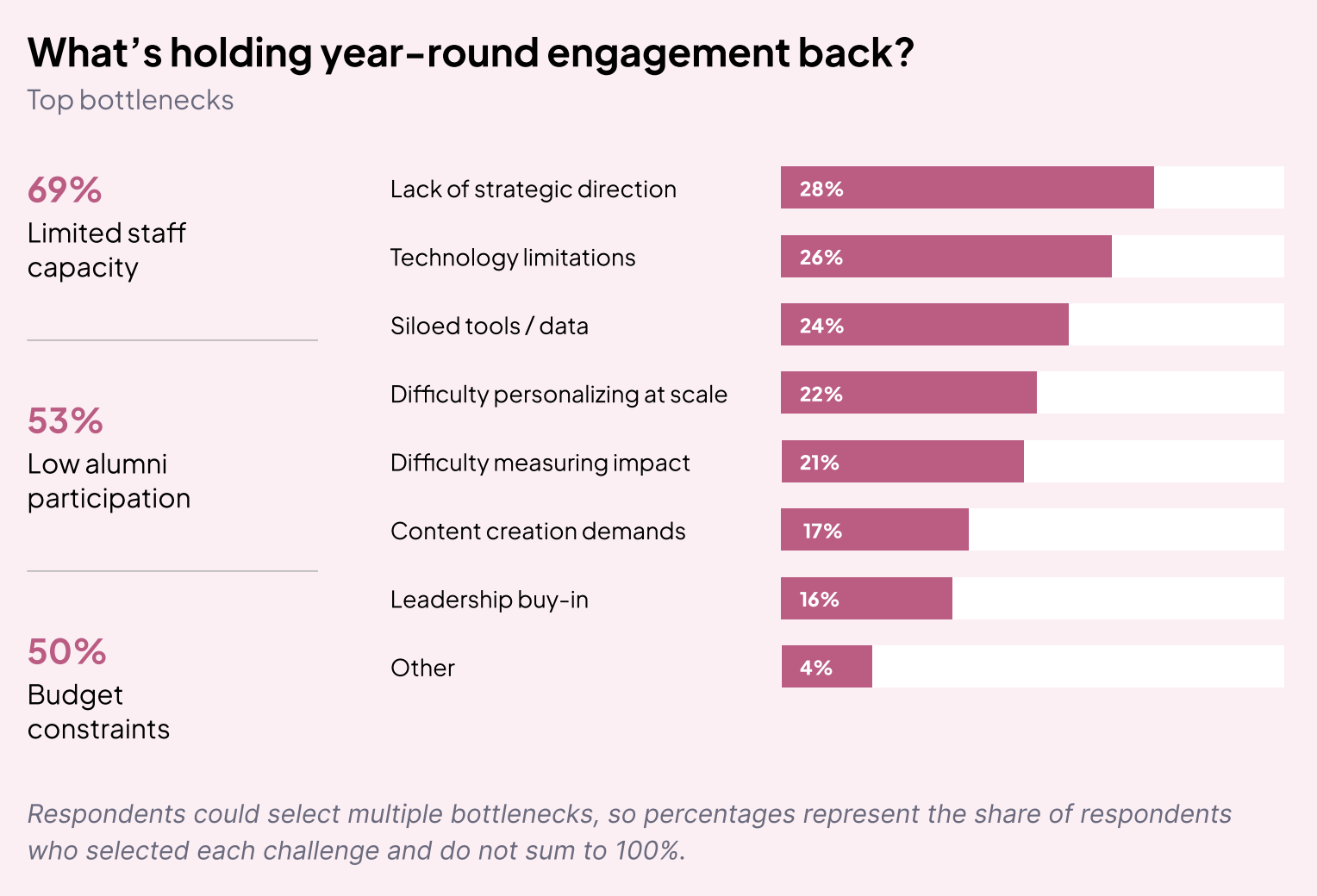
This challenge shows up regardless of team size. A third of respondents work in teams of five people or fewer, but larger teams reported the same problem.
Take a mentorship program, for example: Someone has to match mentors and mentees, send reminders, handle drop-offs, and prepare for the next cohort. As the report puts it, successful engagement creates more work, and the more opportunities you offer, the harder they become to sustain.
The tension between wanting more and delivering more
As teams move beyond an event-centric model, they're supporting more initiatives throughout the year. More opportunities for alumni also means more resources are needed to keep those programs going.
Low alumni participation adds another layer. More than half of respondents (53%) named it as one of their biggest barriers, and young alumni came up again and again as the hardest audience to engage consistently. Ironically, these are also the years when engagement matters most. But the period right after graduation is often the busiest in an alum's life, so institutional communications easily get lost among career changes and personal milestones.
Sherborne Boys School in England runs roughly 40 events a year with a two-person team, and one of its changes was timing careers events for the week before university terms start, when younger alumni are actually reachable. Read more about what the team changed in the report.
3. Personalization is still more aspiration than reality
Most institutions already have a lot of information about their alumni. The survey shows which data points teams rely on most to segment their audiences:
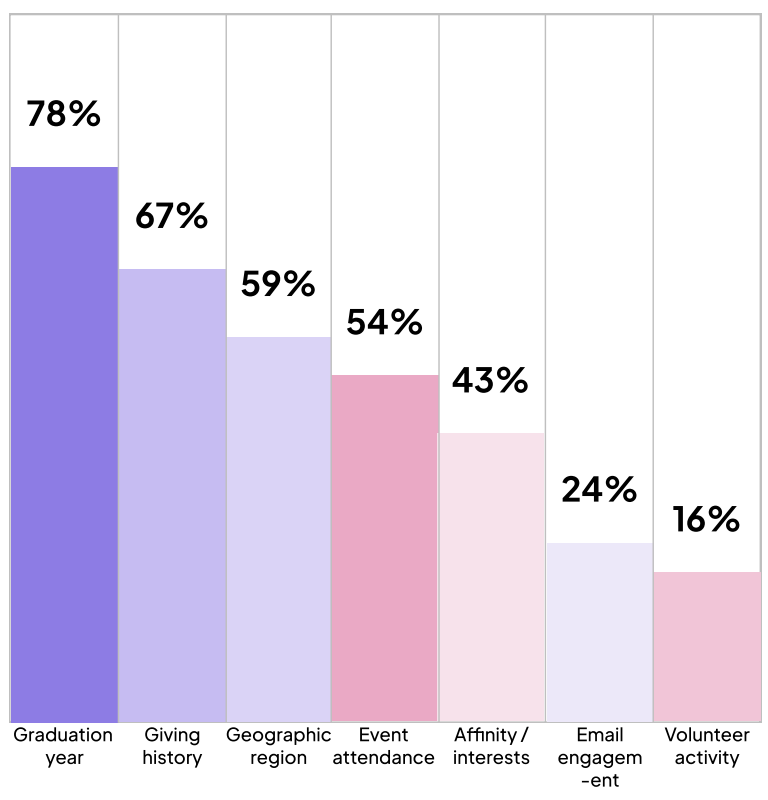
Other segments: Career/industry (20%), Volunteer activity(16%), Community participation (9%), Little or nosegmentation (8%), and Constituent type (1%).
Knowing who someone is vs. what they care about
A graduation year and a major tell you who someone was when they left campus. They don't tell you what that person cares about today or what would make them want to engage again.
According to the 2026 National Alumni Survey, fewer than 1 in 10 alumni feel very well known by their institution, and 54% say their personal interests aren't known at all. Only 14% believe their institution has a good understanding of their current career or life stage.
Our survey shows the same gap from the institution's side. When we asked respondents to describe how personalized their engagement is:
- 48 use basic segmentation, such as sending different emails based on graduation year or giving history
- 27 send one-size-fits-all communications
- 20 have moderately personalized journeys
- 1 reported highly personalized engagement across channels
Why personalization is hard to do at scale
Part of the problem is what happens after an alum engages for the first time. Only 3 of 103 respondents describe their engagement journeys as fully structured, while 77 report no formal journeys and rely on manual processes or ad hoc follow-ups instead.
That means an alum might attend an event, make a gift, volunteer for the first time, or join a mentorship program, and what happens next often depends on individual staff members rather than a consistent engagement strategy. Each interaction risks becoming a standalone touchpoint instead of a step in a longer relationship.
The good news is that many of the signals you need already exist in everyday interactions like event registrations, volunteer sign-ups, and email engagement. Asking a few simple questions can also go a long way, such as:
- What causes do you care about?
- Which events interest you?
- What skills would you be willing to share?
- How would you like to stay involved?
Once you have those answers, planning the next step becomes much clearer. If an alum is looking for their first job, a networking opportunity or a career mentor might be the right fit. As our breakdown of the 2026 National Alumni Survey put it, alumni want to feel that what they receive reflects where they are in life right now.
4. Engagement measurement has a visibility problem
Teams are running more programs than ever, but many of them can't see the full picture of what all that work is producing.
Only 12 of 103 respondents said they can clearly connect their engagement efforts to fundraising outcomes, and 1 in 4 identified siloed tools and data as a major barrier to scaling year-round engagement.
When event data lives in one tool, email engagement in another, and giving history in the CRM, it becomes very hard to see how one alum's journey is unfolding. You might know that someone attended a networking event, but you might not know that they also opened your last three newsletters, volunteered in the spring, and are now showing signs of being ready to give.
Why measurement needs to go beyond attendance
Attendance and registrations are useful indicators, but on their own, they don't tell you whether today's engagement is creating tomorrow's advocates and donors. If engagement and fundraising are tracked as separate stories, teams end up optimizing for activity rather than outcomes.
A few ways to broaden what you measure:
- Use a wider framework: CASE measures alumni engagement across four modes: philanthropic, volunteer, experiential, and communications. Looking across all four gives you a fuller picture.
- Track repeat engagement: Look at repeat vs. first-time participants and volunteer-to-donor conversion rates. Our guide to alumni engagement metrics goes through these and more.
- Map the journey: Pick one program and identify the milestones that show an alum is becoming more engaged. Then ask whether you can see that entire journey in one place, or if it's spread across multiple systems.
Cornell College had 1.5 people in alumni relations and 16 across advancement, running five to eight disconnected systems that no one could fully manage after key staff turnover. Instead of changing everything at once, the team moved to one system in stages. They started with homecoming registration and giving days before moving on to the alumni network. You can read how they did it in the full report.
5. AI is moving from curiosity to practical use
It's been more than three years since generative AI went mainstream, and for advancement teams, it's no longer a novelty. Our survey found that nearly 6 in 10 respondents are already using AI in some capacity:
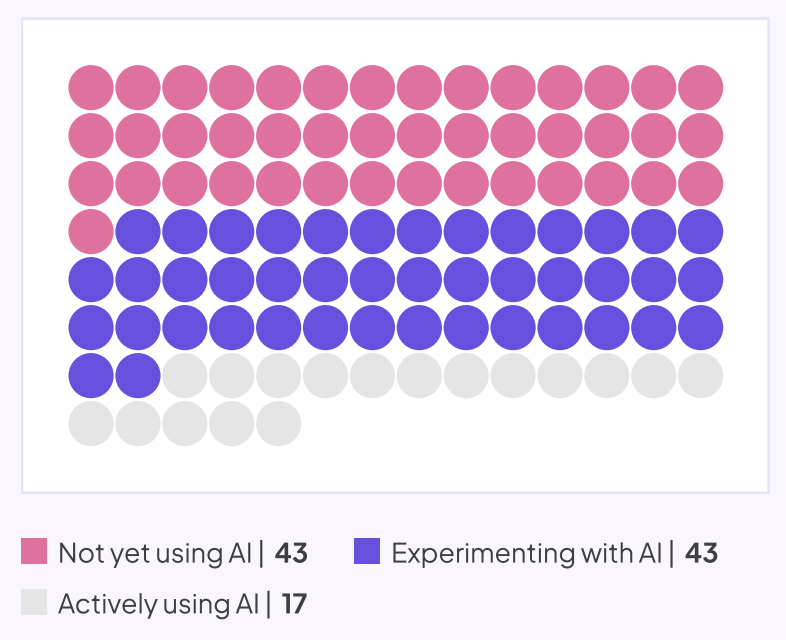
This lines up with what's happening across higher education more broadly. Ellucian's 2026 AI survey report found that 66% of respondents say their institution is now using AI, up from 49% the year before.
Where advancement teams want AI's help
When we asked where AI could help most, the answers mirrored the bottlenecks from earlier in the report:
- Reporting and analytics (62%)
- Personalization at scale (50%)
- Content creation (47%)
- Identifying high-intent alumni (39%)
- Event follow-up and nurturing (39%)
- Donor readiness insights (34%)
Only 7% of respondents said they don't currently see a need for AI support. Teams are looking at AI for their biggest bottlenecks first, which suggests it's being seen more as an operational partner.
What to hand over to AI and what to keep human
Rather than evaluating AI tools one by one, the report suggests looking at your team's workload and sorting recurring work into three buckets:
- Automate: Repetitive, rules-based work like cleaning alumni records, generating reports, scheduling communications, summarizing survey responses, and processing event registrations.
- Augment: Work where AI helps staff move faster and make better decisions, such as drafting stewardship emails, personalizing communications, researching prospects, and creating campaign content.
- Retain (human-led): Work that depends on trust, empathy, and judgment, including major gift conversations, donor stewardship, volunteer management, alumni mentoring, campaign strategy, and sensitive communications.
That last bucket matters a lot in advancement. Your team holds some of the most sensitive data an institution has, like giving history and personal details shared over years of stewardship. It's no surprise that data security and privacy remain the top barrier to AI adoption in higher education, cited by 61% of individuals and 56% of institutions. As we covered in our look at where AI in advancement stands today, the goal is to use AI in ways that protect the relationships your team has spent years building.
What this means for advancement teams
If we put these five findings together, a clear picture comes through: Most advancement teams have already moved past the idea that a few big events are enough. They're building more ways for alumni to stay connected, and they understand why it matters.
Most teams have plenty of ideas. The harder part is keeping those ideas going when small teams are stretched across multiple programs and alumni data is scattered across systems. Many teams also can't see whether their work is leading to deeper engagement or giving, and AI is increasingly being looked at as a way to take some of that pressure off.
If you're thinking about where to start, here are a few takeaways from the report:
- Review your current programs before adding new ones. Strengthen what works, simplify what relies on too many manual steps, and retire what no longer delivers enough value.
- Collect better indicators about what your alumni care about, and use them to decide what each person should hear about next and to plan their longer journey.
- Bring your data together so you can follow an alum's journey from their first interaction to their first gift.
- Be deliberate about AI. Let it handle repetitive work so your team has more time for the conversations that need a human.
Year-round engagement is ultimately about making it easier for alumni to stay connected in ways that matter to them. The full report covers each of these findings in more depth, along with seven stories from institutions like Punahou, Sherborne Boys School, and Cornell College on what they changed and why it worked.
Download The State of Year-Round Alumni Engagement (2026) report

The State of Year-Round Alumni Engagement: 5 Findings from Our 2026 Survey
Explore 5 key findings from our 2026 survey of 103 advancement professionals on year-round alumni engagement, including challenges, personalization, measurement, and AI.

Prajnya Yelamali
October 22, 2026
12 minutes
Over 400 billion emails get sent every single day! That’s a huge number, and maybe not too surprising when you look at your very own inbox and see 2,359 unread emails.
Yet, email remains one of the most effective ways to communicate with alumni.
So, how do we make our emails stand out?
To answer this, we caught up with Ashley Budd, nonprofit consultant, former Senior Marketing Director at Cornell University, and co-author of Mailed It! She has spent years working on alumni communications and has plenty of lessons to share.
In our recent webinar, How to Write Emails Alumni Actually Want to Open (Even in the Age of AI), Ashley walked us through what makes people open emails, read them, and take action.
Here are seven practical lessons from the session that you can try in your next alumni email.
1. Write for people who are in a hurry
Think about how you read your emails. Do you read every word? Or do you scan the subject lines, glance at a few messages, and open the ones that catch your attention?
Your alumni do the same.
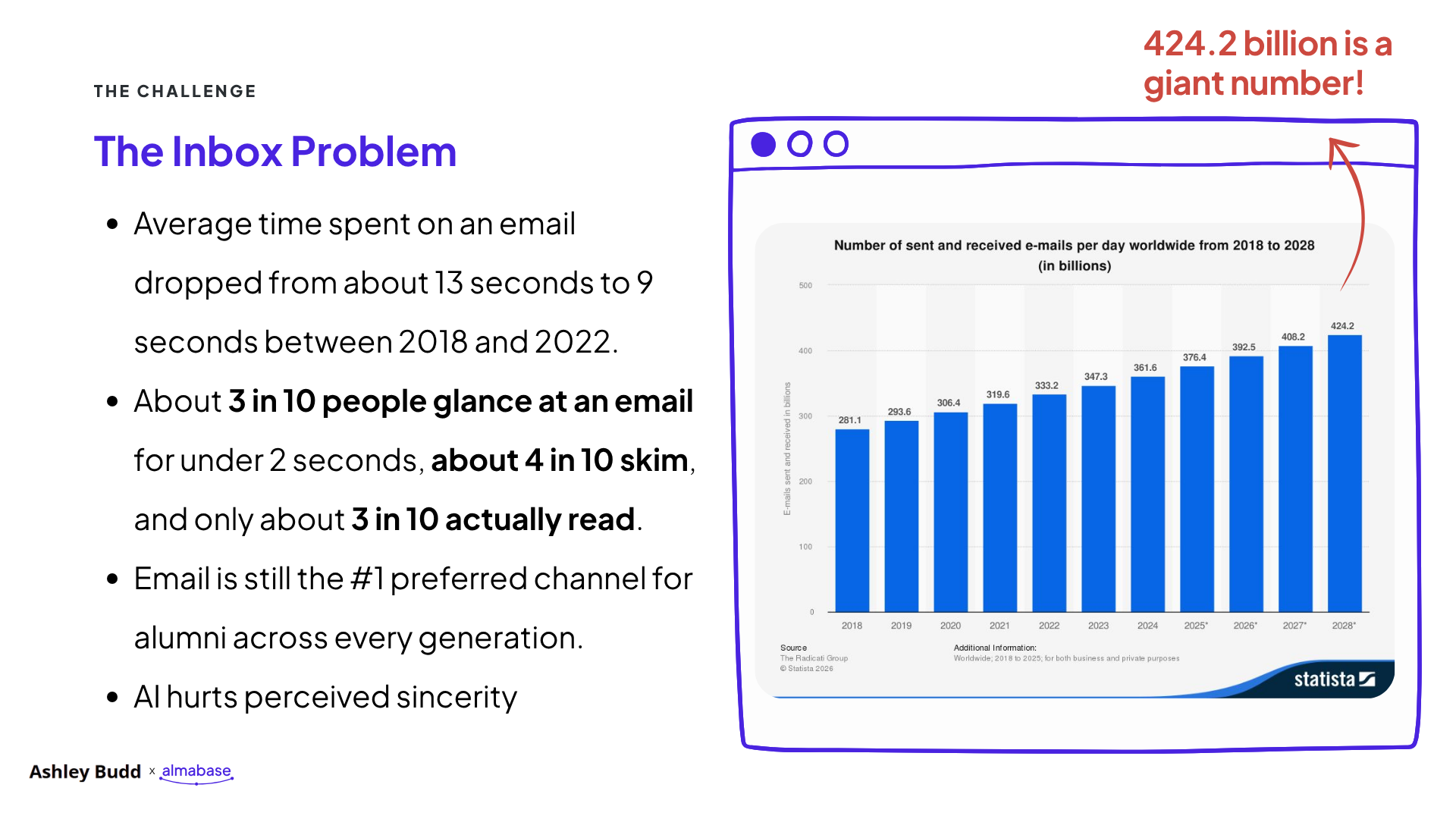
During the webinar, Ashley shared research showing that the average time people spent reading an email dropped from around 13 seconds in 2018 to 9 seconds in 2022. About 3 in 10 people glance at an email for less than two seconds, while around 4 in 10 skim it.
That leaves you with very little time to get your message across.
Ashley's advice is simple: write for the two-second glance.
What you can do
- Put your main message in the first sentence.
- Keep paragraphs short.
- Use bold text to highlight important details.
- Make your call-to-action button easy to find.
- Keep event dates, deadlines, and other key information in the email text, where people can scan it quickly.
Try this: Open your next alumni email and look at it for two seconds. Then look away. Can you tell what the email is about and what the reader should do?
If you can't, it's time to simplify.
2. Write subject lines that tell people what's inside
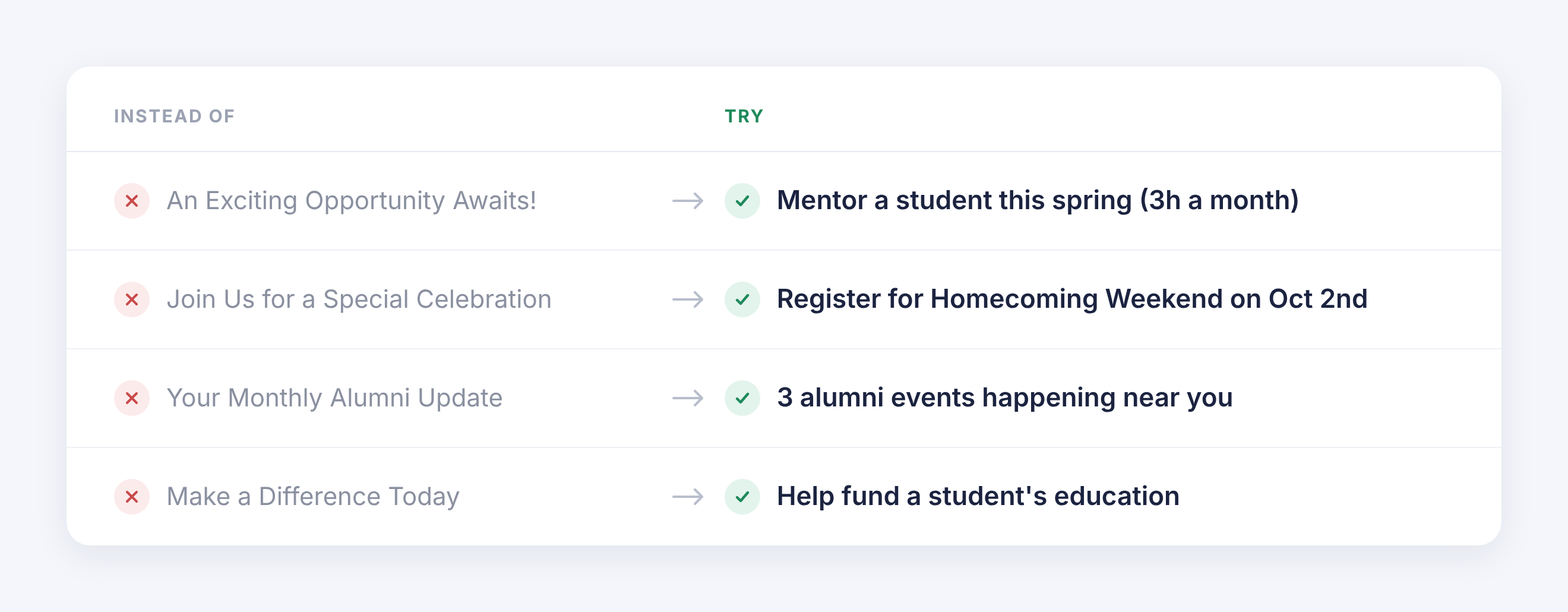
We spend a lot of time trying to write clever subject lines. But when people have hundreds of emails to get through, they want to know what each email is about.
During the webinar, we shared this example.
Option A: Alumni Newsletter | October 2026 | Issue 14 Option B: Homecoming photos and 3 alumni events near you
Which one would you open?
Option B gives readers a better idea of what they'll find inside. But there's a catch. If your alumni newsletter has built a strong reputation and people recognize its name, leading with the newsletter's name might work better. It all comes down to relevance. Think about what your audience recognizes, what they care about, and what would make them want to open your email.
Ashley recommends keeping subject lines to around six to nine words. Use simple language and give readers enough information to decide whether the email is worth opening.
Your sender name matters too. People check who sent an email before deciding whether to open it. Use a name your alumni will recognize, whether that's your institution, an alumni association, or a familiar staff member.
Try this: Before sending your next email, write three subject lines. Ask a colleague to pick the one that tells them the most about the email. Use that feedback to improve your final version.
3. Send emails that matter to each group of alumni
Imagine you're hosting an alumni networking event in Boston. You send an invitation to every alumnus in your database, including people who live thousands of miles away. Some might be interested, but most won't be able to attend. This is where audience segmentation helps.
Ashley suggested grouping alumni into three broad categories based on their engagement.
Off-the-grid alumni: People you have trouble reaching. Their contact details may be outdated, or they haven't interacted with your communications in a long time.
Wallflowers: People who occasionally open your emails but rarely attend events, volunteer, or donate.
Engaged alumni: People who regularly open emails, click links, attend events, volunteer, or give.
Each group needs a different approach. Your engaged alumni may be happy to hear from you more often. Wallflowers may respond better to fewer emails with a clear reason to get involved. Off-the-grid alumni may need help reconnecting with your institution.
What you can do
Start with the information you already have.
- Location: Invite alumni to events happening near them.
- Graduation year: Share reunion details and updates relevant to their class.
- Event attendance: Follow up with attendees and invite them to related activities.
- Giving history: Share fundraising opportunities that fit their relationship with your institution.
- Past engagement: Send volunteers information about upcoming opportunities to contribute.
You can also ask alumni what they'd like to hear about. A short survey or a simple choice within an email can help you understand their interests. You don't need to build dozens of segments on day one. Start with two or three groups and see how the response changes.
If your team uses Beacon, Almabase’s fundraising marketing platform, you can segment alumni by giving history, location, and class year, then use dynamic content to tailor each email to the group receiving it. If you use Raiser’s Edge NXT, you can also use your existing segments directly, without exporting or uploading data.
Try this: Pick an upcoming event or campaign. Instead of sending the same email to everyone, create two versions for different groups of alumni. Change the opening, the details, and the call to action to suit each audience.
Then compare the results.
4. Start with what matters to your reader
A common mistake in advancement emails is spending too much time talking about the institution. The email starts with the department, explains the program's history, and eventually gets to the reason for writing. By then, the reader may have moved on.
During the webinar, Ashley showed an example of a Giving Day email.
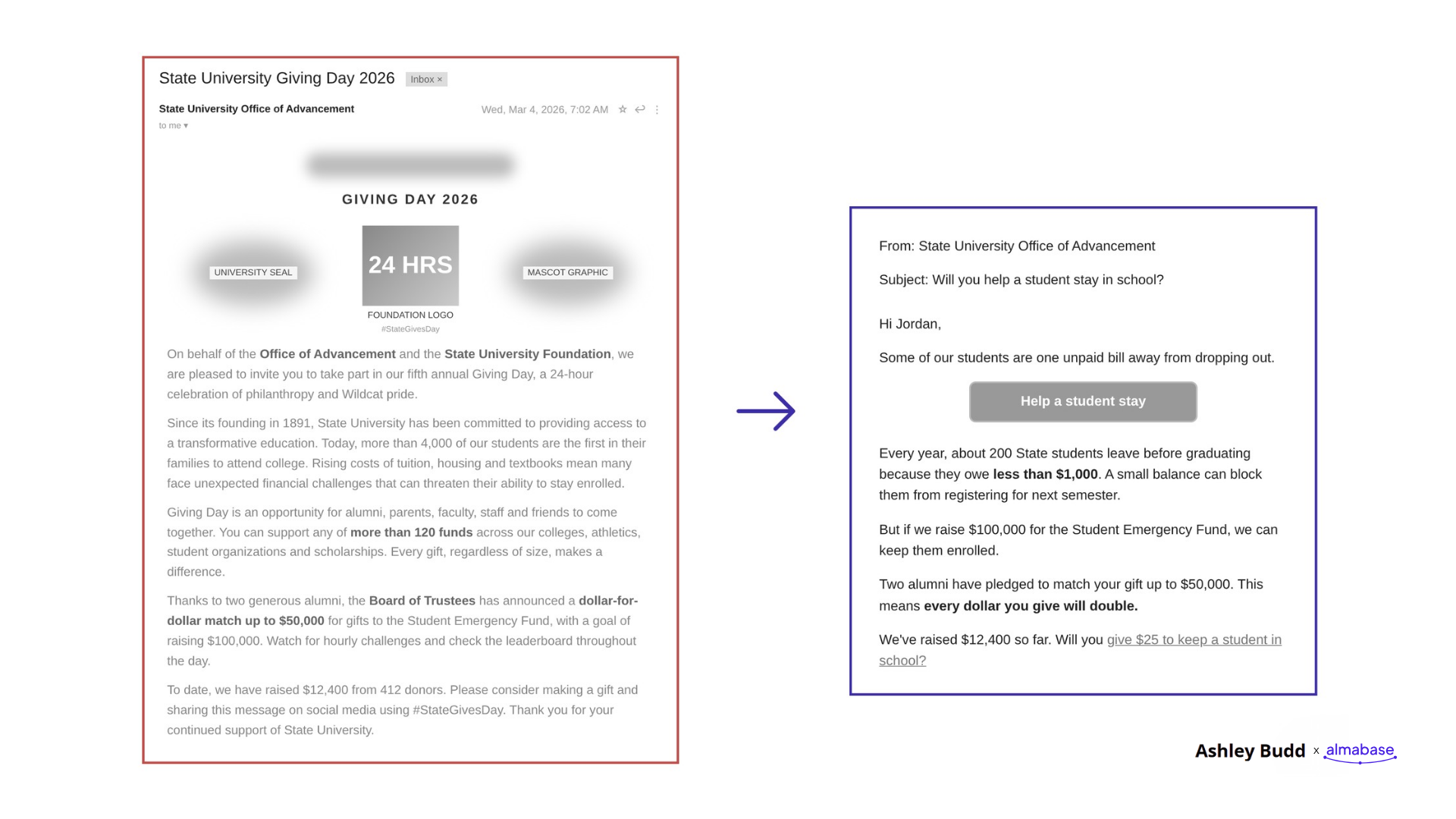
The original version included background about the foundation and its campaign. The revised version opened with a clear message:
Subject line: Will you help a student stay in school?
Opening line: Some of our students are one unpaid bill away from dropping out.
Call to action: Help a student stay.
The revised email quickly explains why the campaign matters and how the reader can help. This approach works for alumni events, mentoring programs, volunteer opportunities, and fundraising appeals.
What you can do
Before writing your next email, ask yourself:
- Why should the reader care?
- What will they gain, or what difference can they make?
- What do I want them to do next?
Use your answers to write the opening. For example, if you're promoting a mentoring program, you could write:"Help a student take the next step in their career. Share your experience as a mentor this spring."
This gives alumni a clear reason to get involved. You can add more information about the program further down the email.
Try this: Look at the first two sentences of your next email. Do they explain why the message matters to the reader? If they mainly talk about your department or institution, rewrite them.
5. Make it easy for people to take action
Once someone opens your email, the next job is to help them understand what to do. Ashley shared five elements that can make emails easier to read and act on.
• Use simple language
Ashley recommends writing at around a sixth- to ninth-grade reading level. This helps people understand your message quickly, especially when they're scanning it on their phones.
For example:
Instead of: "We invite you to participate in an opportunity to facilitate meaningful professional development for students."
Try: "Help a student prepare for their future career."
Read your email aloud. If a sentence sounds too formal or takes a second read to understand, rewrite it. Ashley suggested Hemingway Editor to check the reading level of your writing and highlights sentences that are hard to read.
• Keep one main call to action
Every email should have a clear purpose. Are you asking alumni to register for an event, make a gift, or sign up as a mentor? Choose one main action and make it easy to find. You can include other links when necessary, but make sure the primary action stands out.
• Write useful button and link text
Links such as "Click here" and "Learn more" don't tell readers much. Ashley recommends using a verb followed by an explanation of what happens next.
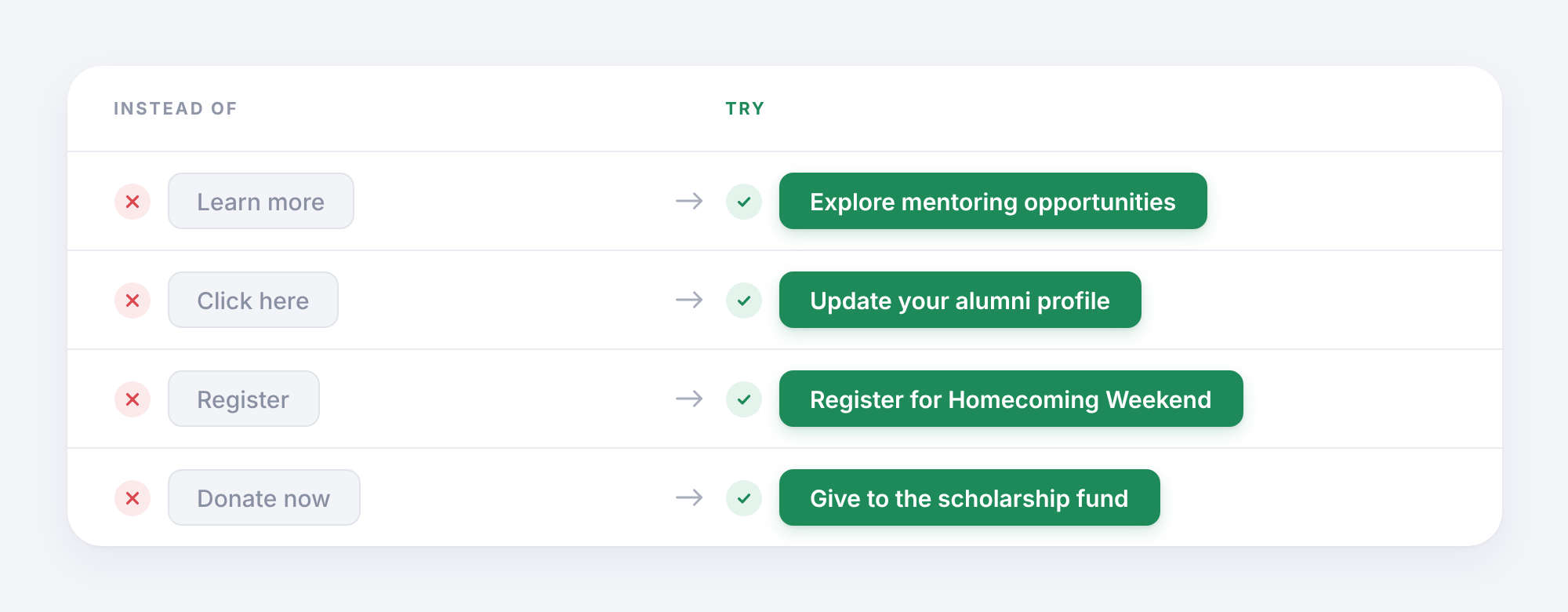
Clear link text helps readers understand where they'll go before they click.
• Put the main action near the top
Many emails place the call-to-action button at the very bottom, after several paragraphs of background information.
Ashley recommends placing the primary button near the top, after the opening message. People who are ready to act can do so immediately. Others can keep reading for more information.
• Keep important details out of image banners
Images can make an email look good, but people may skip over them while scanning. If your event date, location, or registration deadline appears only inside a graphic, readers could miss it. Include these details in the email text too.
Try this: Take your next email and check three things: Can readers understand the main message quickly? Can they find the primary button? Does the button explain what happens when they click?
Small changes here can make your emails much easier to use.
6. Use AI to help you write, then review every word
AI tools can help advancement teams write emails faster. They can suggest subject lines, create first drafts, and adapt messages for different audiences. During the webinar, we discussed several useful ways to bring AI into the writing process.
Where AI can help
- Drafting an email from your notes.
- Generating subject-line options.
- Adapting an email for different alumni groups.
- Summarizing a person's engagement history before writing a personal note.
- Checking for broken links, missing calls to action, and long paragraphs.
These tasks can save time, especially when your team has several campaigns running at once.
However, every draft still needs a human review.
AI can get names, dates, and facts wrong. It can also produce generic language that sounds nothing like your institution. In fundraising communications, these mistakes can affect the trust you've built with alumni and donors.
✨ A prompt to try
"Help me write an email for our alumni relations team.
Goal: [What do we want readers to do?]
Audience: [Who are we writing to? Include their graduation year, location, interests, or past engagement if relevant.]
Key details: [Add the verified information, dates, links, and other facts.]
Write a short email that:
- Opens with the information most relevant to the reader.
- Uses simple, conversational language.
- Explains why the reader should care.
- Includes one clear call to action.
- Has a subject line of six to nine words.
- Avoids generic openings and unnecessary background information.
Do not invent facts, names, statistics, or stories. Flag anything that needs checking. Give me three subject-line options and one email draft."
Once AI gives you a draft, read it carefully. Check the facts, add details from your own knowledge, and edit the language until it sounds like your team.
7. Give every email a quick check before sending
You don't need to spend hours reviewing every email. A short checklist can help you catch common problems before they reach your alumni.
Ashley reviewed several real advancement emails during the webinar, including a Homecoming invitation, an alumni networking invitation, and an alumni newsletter. Her feedback focused on making the message easier to follow, bringing key information forward, and helping readers find the next step.
Here's a checklist you can use with your team.
Your five-minute email checklist
- Is the sender name familiar to the audience?
- Does the subject line explain what's inside?
- Does the first sentence tell readers why the email matters?
- Can someone understand the main message in two seconds?
- Is the language simple and easy to scan?
- Is there one clear primary call to action?
- Does the button explain what happens next?
- Are the most important details near the top?
- Have you checked all names, dates, facts, and links?
- Does the email sound like your institution?
- Have you checked how it looks on a phone?
You can also ask a colleague to read the email for two seconds and explain what they understood. If they can't identify the main message, you have a clear place to start editing.
💡Put these lessons into practice
Writing better alumni emails starts with a few simple habits.
Make your subject lines clearer. Use the first sentence well. Send relevant messages to the right groups. Keep your language simple and make the next step obvious.
For your next campaign, choose one email and try three changes:
- Rewrite the subject line so readers know what to expect.
- Change the opening to focus on what matters to your audience.
- Move the main call to action closer to the top.
Then look at how your alumni respond.
Over time, these small changes can help your team build emails that people find useful and want to engage with.
Want to learn more?
This article is based on our webinar with Ashley Budd, How to Write Emails Alumni Actually Want to Open (Even in the Age of AI).
Watch here:
You can find Ashley's newsletter and more of her work at ashleybudd.com.
For more on creating relevant alumni communications, explore Almabase's fundraising marketing platform.
.png)
How to write emails that your alumni actually want to read (even in the age of AI)
Learn 7 practical tips from Ashley Budd to write better alumni emails, improve open rates, personalize messages, and drive engagement with AI.

Sushmitha
October 21, 2026
12 minutes
Medical fundraising has an entirely different set of requirements than traditional nonprofit or association fundraising. This is because medical organizations have to navigate a heavily regulated landscape that includes privacy compliance laws and HIPAA standards, which sometimes limit traditional fundraising opportunities, all while maintaining a deeply empathetic approach to potential donors.
Robust software helps your healthcare organization build reliable fundraising pipelines while still prioritizing the patient experience. This article explores essential features that development teams should prioritize when evaluating healthcare-focused donor management platforms.
1. Integration with existing software
Medical facilities typically rely on a complex ecosystem of patient management, billing, and communication tools. Your donor management platform should be an extension of your existing healthcare constituent relationship management (CRM) system to reduce the cognitive load of switching between platforms and increase the visibility of potential donors' data.
Your donor management system should:
- Sync with existing patient data storage systems: Your organization likely already has a patient management system tracking each patient’s contact, scheduling, and billing data. Sync your donor management platform with your existing system so your administrative team can easily analyze your data to identify prospective donors.
- Automatically log and clean data: Standardized data entry processes, removal of duplicate files, and automatic logging of donor profile information all reduce the administrative load of analyzing your donor database.
- Support specialized healthcare fundraising channels: Medical philanthropy often relies on unique campaigns like grateful patient programs, memorial gifts, and restricted donations for specific hospital wings or research initiatives. Your donor management system should include built-in tools to manage tribute giving and track complex fund designations, ensuring that contributions are accurately routed to the specific departments or equipment upgrades your donors intended to support.
Make sure your donor management database is completely separate from your electronic health records (EHR). To maintain HIPAA compliance, your team cannot include any protected health information (PHI) in their donation requests or solicitation efforts. The easiest method to maintain regulatory compliance while navigating a donation is to isolate your donor system from sensitive information.
Wondering what HIPAA compliance looks like for you? Check out our HIPAA Compliance Checklist for Healthcare Organizations.
2. Grateful patient databases
Frontline clinicians naturally build deep, trusting relationships with patients and their families. They can also become a primary source of referrals, connecting patients with your fundraising and development team.
Grateful patient programs are unique to the healthcare sector and one of your most valuable fundraising opportunities. BWF defines grateful patient programs as a healthcare fundraising and engagement system that allows past patients and their families to financially support or honor the medical staff and facilities that provided their care.
If a patient or family initiates a conversation about giving back, train your physicians to provide the contact details of your institution’s development and fundraising office. Physicians can also directly refer a patient’s name and contact information to your development office, but they should not participate in solicitation conversations or log donation data themselves in order to maintain ethical guidelines set by the American Medical Association.
You can also use patient follow-up procedures and patient satisfaction surveys to identify individuals who might be interested in contributing financially to your organization. Track the responses and feedback you receive in your CRM. Ensure that any surveys used for this purpose include the legally required HIPAA opt-out language for fundraising communications.

Track your positive survey responses and grateful patient referrals in your donor database to maintain a record of patients and families who have had positive experiences with your care. Your grateful patient database provides a ready list of individuals who may be interested in contributing to your organization through fundraising campaigns.
Segment your grateful patients based on the programs they’ve vocally expressed interest in supporting, and send event invitations and funding appeals on a semi-regular basis. When constructing your grateful patient appeals, it’s important to remove any sensitive health information from your requests and to cease contact if the patient requests. Individuals who have had their lives impacted by your care should be able to give on their own terms.
3. Campaigns and community initiative hosting
Healthcare practices often run diverse fundraising initiatives simultaneously, from cause-specific initiatives, such as cancer awareness fundraisers, to giving days to community-driven health awareness events. Your fundraising efforts should reflect opportunities to support this array of causes. Likewise, your software system should be able to manage a wide variety of campaigns and donors simultaneously.
Make sure your system can:
- Automatically log new donors: Create donor profiles that automatically collect necessary contact information, financial data, and past donations and causes for each new supporter. These profiles help your team better understand your donor base and plan new initiatives that reflect your donors’ interests.
- Send stewardship letters: Every donor wants to be thanked. Make sure your CMS can automatically send a donation receipt and a warm thank-you letter every time you log a new contribution, so your donors know you received their gift.
- Manage multiple campaigns simultaneously: Sync your donation platform to your backend data logging so that your contribution data can easily be transferred from your payment portal to your donor profiles. This reduces the need for manual data entry and the risk of human error when running simultaneous, large-scale campaigns.
- Host flexible giving options: Healthcare organizations host a wide variety of fundraising types, ranging from events such as days of giving to long-term capital campaigns for research causes and building expansions. Your donation platform should be able to handle recurring and one-time donations, as well as large influxes of new donors.
Your chosen platform should prioritize your donors’ user experience and easy data management for your team. Walk through the donation process yourself to ensure your donors can give to your cause conveniently. If you experience slow load times or a confusing experience, your donors likely do, too.
4. Advanced technology for intelligent prospect research
AI and automated technologies can help your team analyze donor data efficiently and identify the strongest prospective supporters within your existing network. You can use AI to:
- Track donation frequency. In particular, assess donor giving patterns. Do you have a wide array of contributors who give once a month, or a few supporters who contribute major gifts at certain times of the year? Having this information can help your team anticipate revenue flow and plan major initiatives.
- Identify prospective donors. AI tools can track when patients or supporters mention a donation in conversations with their clinicians or enter conversations about supporting specific programs and treatments. These may indicate a desire to provide financial support for your practice.
- Send targeted outreach based on demographics. Certain supporters have things in common: treatment histories, interests in specific areas of your organization’s services or research, or amounts donated. AI can identify these common interests, group those supporters, and create newsletters, impact reports, and donation requests tailored specifically to each segment.
- Identify supporters for increased gifts. Some long-term donors may be interested in contributing a larger sum to your healthcare organization, but may not know how to begin the process. Use AI to screen mid-level and long-term donors for indicators that they might be willing to make a major gift, such as an affinity for a specific research topic or an increase in their financial capacity.
While AI can be a useful tool in healthcare fundraising, it’s best to use it with caution. Promptly’s guide to AI in healthcare explores how to use AI effectively while creating a strong AI data governance policy.
Always make sure that the AI cannot share any of your data with outside servers, and double-check its outputs to reduce your chance of hallucinations.
Avoid including PHI in your AI data inputs to maintain compliance with HIPAA standards.
Wrapping Up
Acquiring the right technology is only the first step in establishing a strong donor base for your healthcare organization. Consistent stewardship, driven by accurate data and respectful communication, ensures that one-time grateful patients evolve into dedicated, lifelong champions of your mission.
After acquiring new donors, use your donor management system to create an outreach cadence that keeps your supporters up-to-date on new research initiatives, treatment options, programs, and the impact of their donations. This way, they know their contributions are seen and felt by everyone in your organization.
.jpg)
Choosing the Best Software for Managing Medical Donors
Medical fundraising presents a unique set of challenges. Explore how the right software can help your team manage medical donors and expand your revenue base.
Almabase
October 13, 2026
12 minutes
Hosting is often the most exciting part of a fundraising event like a gala. A room full of people, high energy, and months of work that finally comes together over a few hours. What guests see that evening is only a small part of everything that went into making it happen.
Nonprofits and foundations have been hosting galas for years, and they remain a popular choice because they bring people together, get them invested in a cause, and create a wonderful opportunity to raise funds. The format has changed over time, but the gala has hardly gone out of style.
Bringing hundreds of details together in one evening takes more than a few good ideas working well together. It takes planning, the kind that gives you the room to create an experience that feels true to your organization and leaves guests with something to remember. In this article, we’ll look at the different pieces that go into planning a fundraising gala and how thoughtful execution can turn a well-planned evening into lasting impressions and meaningful fundraising outcomes.
Planning your next fundraising gala? Check out our blog with 10+ Fundraising Gala Ideas for Nonprofits.
A step-by-step look at planning a fundraising gala
A fundraising gala calls for more preparation than other types of fundraisers. Its success depends on careful preparation, thinking ahead, and having the right people involved from the start. Put together a planning committee, assign clear responsibilities, and agree on what you want the gala to accomplish before getting into the finer details. With that foundation in place, you can work through the event's practicalities one area at a time.
1. Setting your fundraising goal and budget
Before you start planning the evening, decide what you want the gala to accomplish. For a healthcare organization, that usually starts with the need behind the fundraiser. Is it new equipment, patient care, research, or a capital project? Once you know what you’re raising money for, put a number to it. This number becomes the target everything else works toward.
Now that you have the fundraising target, work backwards to decide how you’ll get there. Build the event budget around the net amount you want to raise. Factor in the cost of the venue, food, production, entertainment, and other expenses, and leave room for unexpected costs.
Look at what each part of the event will cost and what each revenue stream will contribute. That means considering ticket pricing alongside the cost per guest, and sponsorship income and auction revenue alongside the time and resources it takes to secure and manage them. Consider what you’re promising in return and what it will cost to deliver those benefits.
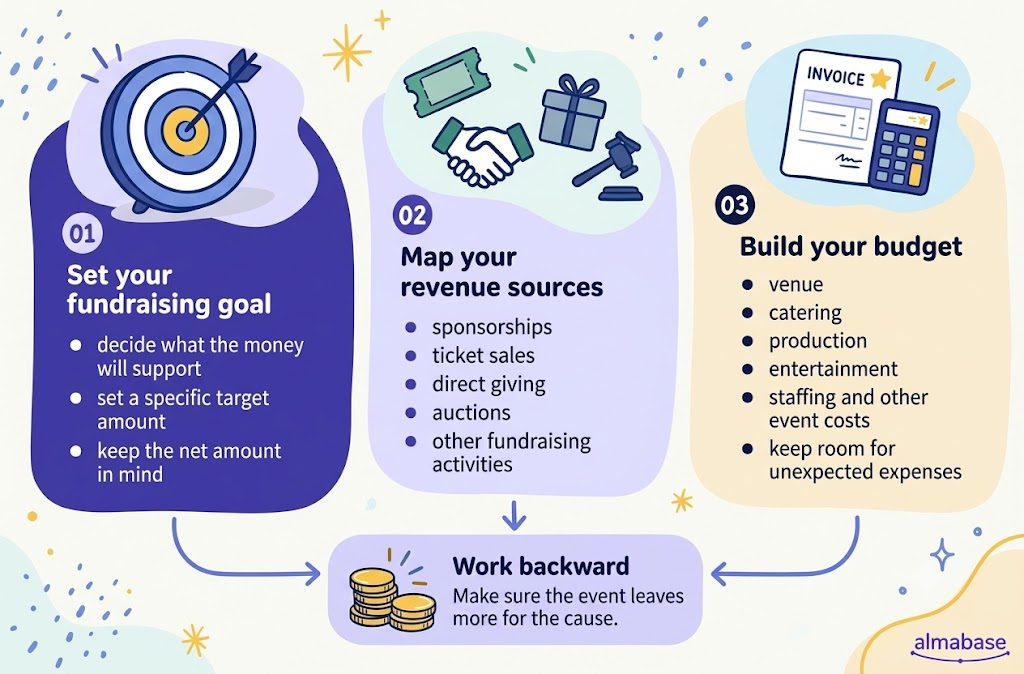
By the end, you should have a clear picture of what you want to raise, where it will come from, what the gala can afford to spend, and what should ultimately go to the cause.
2. Choosing the right date, format, and venue
These three decisions are easier when made together. The date affects who can attend, the format shapes how the evening will run, and the venue needs to support both.
Start with the people you most want in the room. Look at your key donors, sponsors, board members, and prospects, along with other events or busy periods that could compete for their attention. Once you have a few workable dates, think about what kind of evening makes sense for that audience and for the fundraising goal.
Then decide what you want guests to do during the evening. That will help you choose the format.
- Seated dinner: Works well when you want a more structured evening with speeches, patient stories, entertainment, and a focused giving moment.
- Cocktail reception: Gives guests more freedom to move around and network, and can work well for a shorter program.
- Dinner + reception: Lets you use the reception for networking and the dinner for the main program and fundraising.
- Hybrid or online elements: Can bring in people who cannot attend in person and give you more room for online bidding or giving.
You don't have to choose one format from start to finish, either. A reception can lead into dinner, a silent auction can open before the main program, or an online auction can run for several days around the event. The best combination depends on how much time you want to give to networking, entertainment, storytelling, and fundraising.
Choose a venue around this plan: think about how guests will move through the evening, where the fundraising moment will happen, and how easily the space can accommodate catering, AV, auctions, sponsors, and accessibility needs.
3. How to build your gala guest list
Once you have a fundraising target in mind, think about who can help you get there. You need to bring together people who can support the cause, give, introduce others, or build a relationship with your organization.
Your list could include:
- Existing donors and major-gift prospects
- Corporate sponsors and their guests
- First-time attendees with giving potential
- Community and business leaders
- Patients, families, and others connected to your mission
- Board members and key supporters
This is also where your past events and donor data can help. As you build the list, look at who attended, who gave, who brought guests, and who has stayed engaged since the last event. You may find people worth inviting who aren't obvious from your current donor list.
The seating plan can make a lot of difference as well. Think about who could make useful introductions, who should sit near a hospital leader or board member, and who can make a first-time guest feel welcome. Table hosts can take responsibility for some of these conversations rather than leaving them to chance.
Finally, give your most important guests some attention before they arrive. Know who invited them, who will greet them, and who should make the introductions. The right person at the right table can do more for a relationship than a perfectly planned seating chart.
4. Develop a fundraising plan for your gala
At this point, you should have a clear idea of the net amount you want to raise and the total revenue you can expect. Decide what you expect from tickets, sponsorships, auctions, direct giving, and any matching gifts, then look at what each one will cost you to run. Ask yourself these questions:
- Sponsorships: Who are the right partners to approach, what can you offer them, and how many sponsors can you realistically support?
- Ticket sales: Will tickets cover the cost of the evening, contribute to the fundraising goal, or mainly get people through the door?
- Auctions: Is your audience likely to bid, and can your team source and manage items that will generate enough revenue to justify the work?
- Direct giving: How much of the target should come from the main ask, and what will you do before the gala to prepare guests for it?
- Matching gifts: Can you secure a match, and where would it have the most impact during the evening?
Then look at the economics of each expense. What does it actually cost to put one guest in a seat? Add up the venue, food, rentals, production, and other per-guest expenses, then decide how much of that cost the ticket should cover. You may want tickets to cover the event itself while sponsorships and donations drive the actual fundraising, or you may choose a different mix based on your audience.
The same thinking applies to fundraising activities. An auction that brings in $30,000 still takes time and money to source items, manage bids, and run on the night. Factor in those costs, along with payment processing, event technology, marketing, and other fundraising expenses.
It’s also prudent to pay attention to when the money comes in. Sponsorships may be committed months before the gala, while ticket revenue comes in gradually and some donations may arrive after the event. Keep a running view of what has been promised, invoiced, paid, and still outstanding.
When the gala is over, close the loop. Compare the original budget with what you actually spent and collected, reconcile tickets, sponsorships, auctions, and donations, and work out the final net amount raised.
5. Secure your sponsors, tickets, and auction items
Sponsorships
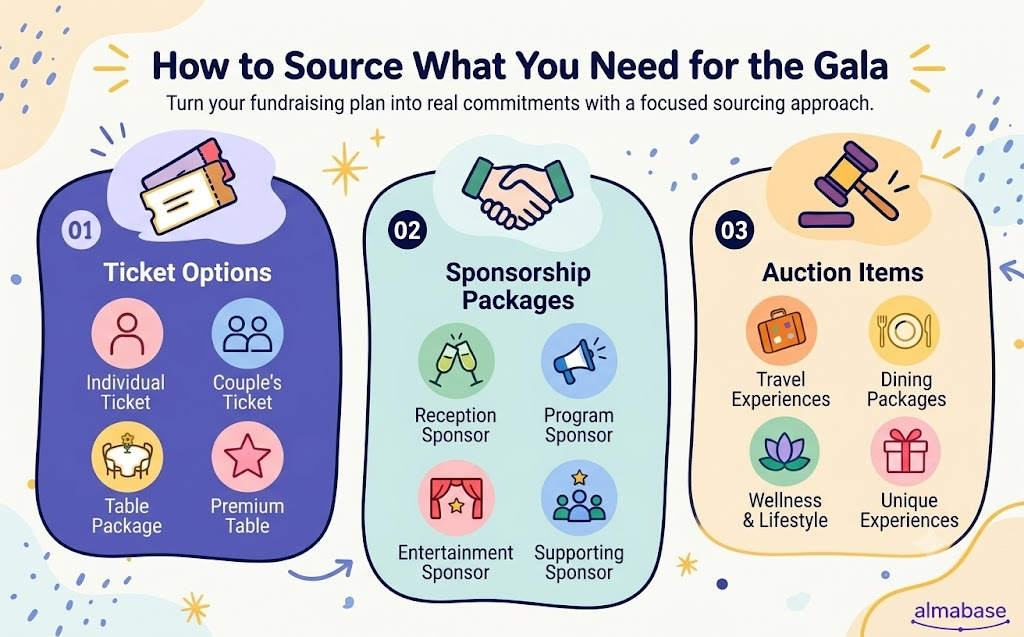
Build your sponsorship menu around the gala itself. Alongside the main sponsorship levels, look at the parts of the evening that have their own value, such as the Fund-A-Need, patient story, reception, dinner, live auction, or guest experience. Keep a few opportunities open so you can shape an offer around a strong prospect rather than forcing everyone into the same package.
This gives you more ways to match a prospect with something they genuinely want to support:
- Large sponsors: Offer a substantial part of the evening, such as the Fund-A-Need or a major program segment, with prominent recognition and premium seating.
- Mid-level sponsors: Package specific experiences such as the reception, dinner, entertainment, or auction.
- Smaller sponsors: Create accessible options around a table, dessert station, photo experience, or guest amenity for local businesses and newer supporters.
Tickets
Ticket sales can help shape the room you want. Look at your previous gala data for where guests came from, which ticket types sold, how many seats sponsors filled, and how many first-time attendees you brought in. Use that to decide what you offer this year.
- Offer individual tickets, two-person options, and table packages where they fit your audience. A small number of premium tables can work if there is preferred seating or another benefit worth paying for.
- Board members, sponsors, and loyal donors can host tables and invite people from their networks. This can be a useful way to bring prospective donors into the room for the first time.
- Give past attendees, donors, and sponsors an early registration window before opening tickets more widely. It gives you an early read on demand and gets some of the room filled early.
- If most of the early registrations are coming from existing donors, for example, shift the next round of promotion toward corporate contacts, patient families, alumni, or another audience you want at the gala.
- Keep some capacity available for major donors, sponsors, speakers, and other priority guests so you are not trying to find seats for them at the last minute.
Auction items
Use last year's bidding results to decide what you need this time. Look for categories that attracted strong bids and gaps in the catalog, then give your team specific categories to source.
- Ask past donors to contribute again when their previous items performed well.
- Make the request specific. A hotel is more likely to respond to “Would you donate a two-night stay with breakfast?” than a general request for an auction item.
- Combine smaller contributions into stronger packages when they work better together.
- Keep a few standout items for the live auction rather than spreading all your strongest lots across the catalog.
Keep a sourcing tracker
The tracker should tell the team what has been asked for, who owns the relationship, and what happens next. Keep fields for:
- Prospect and opportunity
- Specific ask and expected value
- Relationship owner
- Response or status
- Confirmed value
- Next action and owner
- Follow-up date
Update the tracker as people respond, and record both the commitment and the next step. It should leave you with a quick view of what is locked in, what is still up for grabs, and who needs to hear from you next.
6. Plan the program
Build the evening around the moments that need to happen in a particular order. A healthcare gala might move from a welcome and patient story to dinner, auction, case for support, Fund-a-need, and closing, with the exact sequence shaped by the kind of response you want from guests.
Then work through the most important details: who speaks, how long each segment runs, when guests eat or move around, when the auction opens and closes, when the giving appeal happens, and how each transition is handled. Keep speeches short and put the strongest story close to the fundraising moment it supports.
The program also needs a production plan. Confirm scripts and talking points with speakers, give the AV team the final videos and presentations, prepare the auction and giving teams for their cues, and build a run-of-show that includes timings, transitions, responsibilities, and technical cues. Run through the program with the people involved before the event and have a backup for anything that could hold up the evening. The final plan should make it clear what happens, who owns it, what guests are doing at that point, and what needs to be ready before the next segment begins.
7. Managing gala registrations and promotions
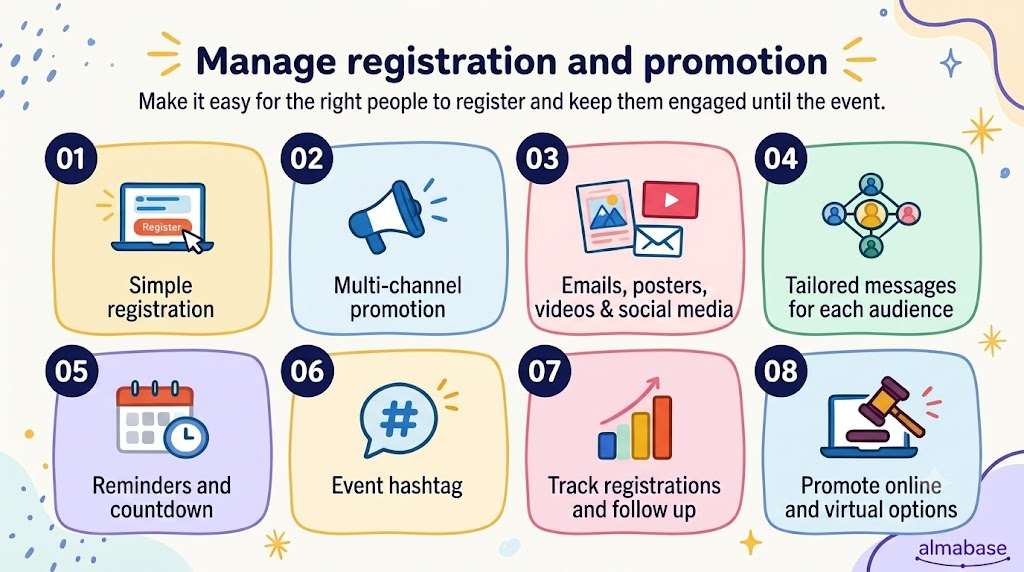
Make registration easy for everyone. Keep the form short, make ticket and table options clear, support mobile registration and multiple payment methods, and collect the guest details you actually need.
Start promotion early across email, social media, your website, posters, partner networks, and direct outreach. Tailor the message to each audience and give board members, sponsors, and table hosts ready-to-share emails, graphics, and videos.
Build momentum with an event announcement, speaker or patient-story videos, sponsor spotlights, countdown posts, and timely registration reminders. Use a simple event hashtag consistently across social posts and event-day content.
Watch registration as it builds. See which audiences and channels are responding, follow up with people who have shown interest but haven't registered, and help sponsors or table hosts fill their seats. If you have an online auction, livestream, or digital giving option, promote those alongside the gala so people who cannot attend can still participate.
8. Prepare your team for event day
By event day, every part of the gala should have a clear plan. Run through the guest journey, logistics, program, fundraising, and technology with the team so everyone knows what happens at every stage.
Assign people to registration, seating, sponsors, auction and giving, speakers and emcees, food and beverages, entertainment, AV, and guest support. Keep a run-of-show with timings, contacts, vendor details, speaker cues, and backup plans. Your emcee should have the latest script, including sponsor acknowledgments, auction instructions, giving cues, and what to do if a segment runs over time. Entertainment should have a defined setup and teardown window so it does not interfere with the program.
Walk through the venue once more to check signage, check-in, seating, stage access, parking, food service, auction displays, payment points, restrooms, and accessibility. Make sure dietary requirements, step-free routes, accessible seating, and other guest needs are covered.
If the gala has a virtual audience, test the stream, audio, captions, slides, giving and auction links, and assign someone to manage online interaction. Finally, give the team a clear escalation plan. If the auction system stops working, a speaker is late, a guest needs assistance, or the program falls behind, people should know who makes the call and what the backup is. That keeps small problems from becoming visible to the whole room.
9. Follow up with guests and close the loop
Start with a timely thank-you. Send guests, donors, sponsors, volunteers, speakers, and partners a message that reflects their role in the evening rather than sending everyone the same note. Follow up separately on outstanding pledges, auction payments, sponsorship commitments, and promised introductions or next steps.
Keep the conversation going after the gala. Share event photos and videos, highlights from the evening, and early fundraising results through email and social media. For donors and sponsors, follow up with something more personal and show what their support will help fund. When you have a concrete update, share that to show what their contribution is making possible.
Then close the loop internally. Compare attendance, revenue, expenses, fundraising by source, auction performance, sponsor participation, and donor response against your original targets. Gather feedback from the team while the event is still fresh. Note what worked, what caused problems, which vendors or processes need changing, and what you would repeat next time. Keep those records with the event data so the next gala starts with a clear picture of what you already learned.
Common mistakes to avoid when hosting a fundraising gala
Keep these in mind as you work through the details:
- Relying on one big fundraising moment: Give guests several opportunities to give throughout the evening.
- One-size-fits-all sponsorships: Tailor packages to each sponsor and the relationship.
- Last-minute sourcing: Secure sponsors, auction items, speakers, and suppliers early on.
- Poor supplier communication: Use clear briefs, regular check-ins, and written confirmations.
- Complicated participation: Make registration, bidding, donations, and virtual access easy.
- Forgetting remote guests: Include online giving, auction access, and virtual participation where relevant.
- Unclear ownership: Assign a clear owner to every part of the event.
- Weak post-event follow-up: Thank supporters, follow up on commitments, and share results.
- Losing the lessons: Capture numbers, feedback, problems, and decisions while they’re fresh.
Fundraising gala checklist
There’s a lot to juggle as the gala gets closer, so we’ve put together a simple fundraising gala checklist to help your team keep track of it all. Add your own deadlines and owners, and use it as a shared document to keep everyone on the same page.
How Almabase can help you run a successful fundraising gala event
A gala has a lot of moving parts. Tickets, sponsors, auction items, guest information, communications, payments, and event-day check-in can quickly end up spread across different tools and make it harder to see what is happening across the event. Almabase brings these workflows together while keeping event and donor data connected to your CRM.
You can set up your event page, ticket tiers, registration forms, sponsorship packages, and fundraising asks in one place. Sponsors can have their own registration flow, select their package, submit guest details and collateral, and manage their payment separately from individual attendees.
For the auction, you can run silent, live, or hybrid auctions through Almabase. Set starting bids and increments, assign items to specific funds, send bid updates, and automate payments after the auction. That also means less cleanup afterward, with auction data syncing back to your CRM.
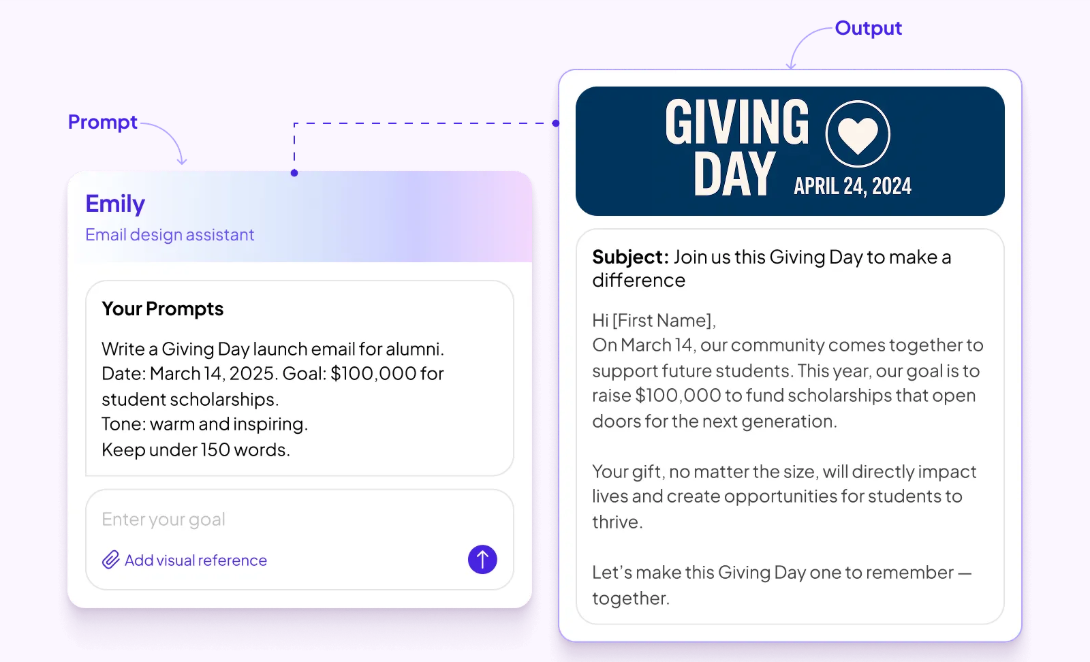
With Emily AI, you can use segmented email and SMS campaigns for invitations, reminders, and follow-ups. It also helps you draft event emails and subject lines based on the context of your event.
On the day, your team can manage QR check-in, payments, seating, guest tracking, and real-time event data from the same platform. After the gala, registrations, attendance, gifts, and engagement can flow into constituent records through Almabase’s CRM integrations, including bi-directional TrueSync with Raiser’s Edge NXT.
That gives your team one connected view of the gala, from the first invitation to the final follow-up, without rebuilding the same data in multiple places.
Wrapping Up
Organising a fundraising gala is a big undertaking, but when the event is well thought through, and nothing is left to chance, magical things can happen. It is an opportunity to connect with your support base, generate excitement, and offer multiple ways for supporters to donate money.
While the upfront cost can be higher than other fundraising events, the many payoffs make it well worth the extra effort. From registration and sponsorships to auctions, event-day management, and donor follow-up, the right technology can help your team manage the gala from start to finish.
Want to see how Almabase can support your next gala? Book a personalized demo and explore how the platform can help you plan, manage, and make the most of your event.
FAQs
1. What are some fun fundraising gala ideas?
Try ideas that give guests something to take part in, such as a themed experience, live auction, interactive entertainment, or a mission-focused giving moment. For healthcare organizations, patient stories and hands-on experiences can also make the cause feel more personal.
2. What are the best things to auction at a fundraising gala?
Experiences, travel packages, dining, and items that have a strong connection to your audience tend to work well. Look for prizes people actually want rather than simply collecting a long list of donations.
4. Can a fundraising gala be held without a live auction?
Yes. You can build the evening around direct giving, sponsorships, a silent auction, or a Fund-a-need instead. The right mix depends on your audience and fundraising target.
5. What should guests wear to a fundraising gala?
The dress code usually depends on the venue and tone of the event. Black tie, formal, cocktail, and themed attire are all common options, so make the expectation clear on the invitation.
6. How long should a fundraising gala last?
Most galas work best when the evening has a clear rhythm and doesn’t let the program drag. Keep speeches and transitions tight, and leave enough time for guests to eat, socialize, and participate in fundraising.
7. What entertainment works well at a fundraising gala?
Live music, performances, comedy, interactive experiences, and guest speakers can all work. Choose entertainment that fits the audience and leaves enough room for the fundraising program.
8. Should you invite patients to a healthcare fundraising gala?
Patients and families can bring a personal connection to the mission, but their participation should always be voluntary and handled with appropriate care and consent.
.jpeg)
How to Plan a Fundraising Gala
Take the stress out of planning your next fundraising gala with this complete, step-by-step look at the process, from 6 months out to day-of logistics.

Sharada Koti
October 8, 2026
12 minutes

For a long time, alumni engagement revolved around a handful of big dates on the calendar. Homecoming, reunions, a gala, and a giving day did most of the heavy lifting, and the months in between remained quiet.
The 2026 National Alumni Survey found that 86% of alumni are satisfied with their overall experience as a student, but only 50% feel the same way about their experience as an alum. Alumni still value their time at the institution, but what many of them are missing is a relationship that carries on after they leave campus.
This is why more advancement teams are trying to stay connected with alumni throughout the year, instead of only around a few key moments. But what does year-round engagement actually look like across advancement teams today? Which programs are teams running, what's getting in the way, and how are they using data, technology, and AI to keep up?
To find out, we surveyed 103 advancement professionals across roughly 90 institutions for our research report, The State of Year-Round Alumni Engagement (2026). Most respondents were based in the US, and we also heard from teams in Canada and the UK. They came from a wide mix of organizations, from solo shops to teams of over 100 people, and from K-12 offices to large public universities.
Since the survey was opt-in, the findings work best as a reference point for spotting patterns across the field. This blog will give you five that stood out the most from the report and what they could mean for your team.
1. Alumni engagement is moving beyond flagship events
Signature events still matter: A reunion or homecoming can create a moment alumni remember for years, but for most teams, those events no longer make up the entire engagement strategy.
When we asked respondents to describe their approach, only 8% said their engagement is mostly event-led. Here's how the rest of the answers broke down:
Teams are building portfolios of smaller touchpoints instead of relying on one flagship program. The most common year-round initiatives in the report were:
- Volunteer opportunities (57%)
- Career networking (48%)
- Alumni storytelling and user-generated content (48%)
- Parent and family engagement (45%)
- Affinity groups (40%)
Class notes, regional communities, mentorship programs, and young alumni programs followed close behind.
What this shift means for advancement teams
As the report points out, every event sorts your alumni into two groups: the ones who can show up and the ones who can't. An alum who lives far away or is raising a young family may want to stay involved but simply can't make it to campus. A broader portfolio gives them a way in.
It also helps alumni feel more connected. The 2026 National Alumni Survey found that alumni who recently volunteered with their alma mater are 8 times more likely to feel very connected and 5 times more likely to feel very informed than those who never have.
That said, more programs don't automatically lead to better engagement. When we asked which initiatives had been most successful for sustained engagement, volunteer opportunities came out on top (34%), followed by affinity groups and regional communities (27% each). Mentorship, on the other hand, came up most often as the hardest program to keep alive.
So before you add another program to the calendar, the report suggests running each one through three questions:
- Does it create meaningful value for alumni?
- Can we sustain it with our current resources?
- Should we expand it, redesign it, or retire it?
Punahou School in Honolulu, for example, used the six-month gap between its February carnival and June alumni luau to plan a multi-year events calendar. You can read how it worked in the full report.
2. Capacity is the biggest barrier to going year-round
Coming up with new engagement ideas is the easy bit for most teams. Keeping those ideas running year after year is where the challenge is.
Limited staff capacity was the most cited barrier in the survey, followed by low alumni participation and budget constraints:
This challenge shows up regardless of team size. A third of respondents work in teams of five people or fewer, but larger teams reported the same problem.
Take a mentorship program, for example: Someone has to match mentors and mentees, send reminders, handle drop-offs, and prepare for the next cohort. As the report puts it, successful engagement creates more work, and the more opportunities you offer, the harder they become to sustain.
The tension between wanting more and delivering more
As teams move beyond an event-centric model, they're supporting more initiatives throughout the year. More opportunities for alumni also means more resources are needed to keep those programs going.
Low alumni participation adds another layer. More than half of respondents (53%) named it as one of their biggest barriers, and young alumni came up again and again as the hardest audience to engage consistently. Ironically, these are also the years when engagement matters most. But the period right after graduation is often the busiest in an alum's life, so institutional communications easily get lost among career changes and personal milestones.
Sherborne Boys School in England runs roughly 40 events a year with a two-person team, and one of its changes was timing careers events for the week before university terms start, when younger alumni are actually reachable. Read more about what the team changed in the report.
3. Personalization is still more aspiration than reality
Most institutions already have a lot of information about their alumni. The survey shows which data points teams rely on most to segment their audiences:
Other segments: Career/industry (20%), Volunteer activity(16%), Community participation (9%), Little or nosegmentation (8%), and Constituent type (1%).
Knowing who someone is vs. what they care about
A graduation year and a major tell you who someone was when they left campus. They don't tell you what that person cares about today or what would make them want to engage again.
According to the 2026 National Alumni Survey, fewer than 1 in 10 alumni feel very well known by their institution, and 54% say their personal interests aren't known at all. Only 14% believe their institution has a good understanding of their current career or life stage.
Our survey shows the same gap from the institution's side. When we asked respondents to describe how personalized their engagement is:
- 48 use basic segmentation, such as sending different emails based on graduation year or giving history
- 27 send one-size-fits-all communications
- 20 have moderately personalized journeys
- 1 reported highly personalized engagement across channels
Why personalization is hard to do at scale
Part of the problem is what happens after an alum engages for the first time. Only 3 of 103 respondents describe their engagement journeys as fully structured, while 77 report no formal journeys and rely on manual processes or ad hoc follow-ups instead.
That means an alum might attend an event, make a gift, volunteer for the first time, or join a mentorship program, and what happens next often depends on individual staff members rather than a consistent engagement strategy. Each interaction risks becoming a standalone touchpoint instead of a step in a longer relationship.
The good news is that many of the signals you need already exist in everyday interactions like event registrations, volunteer sign-ups, and email engagement. Asking a few simple questions can also go a long way, such as:
- What causes do you care about?
- Which events interest you?
- What skills would you be willing to share?
- How would you like to stay involved?
Once you have those answers, planning the next step becomes much clearer. If an alum is looking for their first job, a networking opportunity or a career mentor might be the right fit. As our breakdown of the 2026 National Alumni Survey put it, alumni want to feel that what they receive reflects where they are in life right now.
4. Engagement measurement has a visibility problem
Teams are running more programs than ever, but many of them can't see the full picture of what all that work is producing.
Only 12 of 103 respondents said they can clearly connect their engagement efforts to fundraising outcomes, and 1 in 4 identified siloed tools and data as a major barrier to scaling year-round engagement.
When event data lives in one tool, email engagement in another, and giving history in the CRM, it becomes very hard to see how one alum's journey is unfolding. You might know that someone attended a networking event, but you might not know that they also opened your last three newsletters, volunteered in the spring, and are now showing signs of being ready to give.
Why measurement needs to go beyond attendance
Attendance and registrations are useful indicators, but on their own, they don't tell you whether today's engagement is creating tomorrow's advocates and donors. If engagement and fundraising are tracked as separate stories, teams end up optimizing for activity rather than outcomes.
A few ways to broaden what you measure:
- Use a wider framework: CASE measures alumni engagement across four modes: philanthropic, volunteer, experiential, and communications. Looking across all four gives you a fuller picture.
- Track repeat engagement: Look at repeat vs. first-time participants and volunteer-to-donor conversion rates. Our guide to alumni engagement metrics goes through these and more.
- Map the journey: Pick one program and identify the milestones that show an alum is becoming more engaged. Then ask whether you can see that entire journey in one place, or if it's spread across multiple systems.
Cornell College had 1.5 people in alumni relations and 16 across advancement, running five to eight disconnected systems that no one could fully manage after key staff turnover. Instead of changing everything at once, the team moved to one system in stages. They started with homecoming registration and giving days before moving on to the alumni network. You can read how they did it in the full report.
5. AI is moving from curiosity to practical use
It's been more than three years since generative AI went mainstream, and for advancement teams, it's no longer a novelty. Our survey found that nearly 6 in 10 respondents are already using AI in some capacity:
This lines up with what's happening across higher education more broadly. Ellucian's 2026 AI survey report found that 66% of respondents say their institution is now using AI, up from 49% the year before.
Where advancement teams want AI's help
When we asked where AI could help most, the answers mirrored the bottlenecks from earlier in the report:
- Reporting and analytics (62%)
- Personalization at scale (50%)
- Content creation (47%)
- Identifying high-intent alumni (39%)
- Event follow-up and nurturing (39%)
- Donor readiness insights (34%)
Only 7% of respondents said they don't currently see a need for AI support. Teams are looking at AI for their biggest bottlenecks first, which suggests it's being seen more as an operational partner.
What to hand over to AI and what to keep human
Rather than evaluating AI tools one by one, the report suggests looking at your team's workload and sorting recurring work into three buckets:
- Automate: Repetitive, rules-based work like cleaning alumni records, generating reports, scheduling communications, summarizing survey responses, and processing event registrations.
- Augment: Work where AI helps staff move faster and make better decisions, such as drafting stewardship emails, personalizing communications, researching prospects, and creating campaign content.
- Retain (human-led): Work that depends on trust, empathy, and judgment, including major gift conversations, donor stewardship, volunteer management, alumni mentoring, campaign strategy, and sensitive communications.
That last bucket matters a lot in advancement. Your team holds some of the most sensitive data an institution has, like giving history and personal details shared over years of stewardship. It's no surprise that data security and privacy remain the top barrier to AI adoption in higher education, cited by 61% of individuals and 56% of institutions. As we covered in our look at where AI in advancement stands today, the goal is to use AI in ways that protect the relationships your team has spent years building.
What this means for advancement teams
If we put these five findings together, a clear picture comes through: Most advancement teams have already moved past the idea that a few big events are enough. They're building more ways for alumni to stay connected, and they understand why it matters.
Most teams have plenty of ideas. The harder part is keeping those ideas going when small teams are stretched across multiple programs and alumni data is scattered across systems. Many teams also can't see whether their work is leading to deeper engagement or giving, and AI is increasingly being looked at as a way to take some of that pressure off.
If you're thinking about where to start, here are a few takeaways from the report:
- Review your current programs before adding new ones. Strengthen what works, simplify what relies on too many manual steps, and retire what no longer delivers enough value.
- Collect better indicators about what your alumni care about, and use them to decide what each person should hear about next and to plan their longer journey.
- Bring your data together so you can follow an alum's journey from their first interaction to their first gift.
- Be deliberate about AI. Let it handle repetitive work so your team has more time for the conversations that need a human.
Year-round engagement is ultimately about making it easier for alumni to stay connected in ways that matter to them. The full report covers each of these findings in more depth, along with seven stories from institutions like Punahou, Sherborne Boys School, and Cornell College on what they changed and why it worked.
Download The State of Year-Round Alumni Engagement (2026) report
The State of Year-Round Alumni Engagement: 5 Findings from Our 2026 Survey
Explore 5 key findings from our 2026 survey of 103 advancement professionals on year-round alumni engagement, including challenges, personalization, measurement, and AI.
Alumni Engagement
Prajnya Yelamali
October 22, 2026
12 minutes
Over 400 billion emails get sent every single day! That’s a huge number, and maybe not too surprising when you look at your very own inbox and see 2,359 unread emails.
Yet, email remains one of the most effective ways to communicate with alumni.
So, how do we make our emails stand out?
To answer this, we caught up with Ashley Budd, nonprofit consultant, former Senior Marketing Director at Cornell University, and co-author of Mailed It! She has spent years working on alumni communications and has plenty of lessons to share.
In our recent webinar, How to Write Emails Alumni Actually Want to Open (Even in the Age of AI), Ashley walked us through what makes people open emails, read them, and take action.
Here are seven practical lessons from the session that you can try in your next alumni email.
1. Write for people who are in a hurry
Think about how you read your emails. Do you read every word? Or do you scan the subject lines, glance at a few messages, and open the ones that catch your attention?
Your alumni do the same.
During the webinar, Ashley shared research showing that the average time people spent reading an email dropped from around 13 seconds in 2018 to 9 seconds in 2022. About 3 in 10 people glance at an email for less than two seconds, while around 4 in 10 skim it.
That leaves you with very little time to get your message across.
Ashley's advice is simple: write for the two-second glance.
What you can do
- Put your main message in the first sentence.
- Keep paragraphs short.
- Use bold text to highlight important details.
- Make your call-to-action button easy to find.
- Keep event dates, deadlines, and other key information in the email text, where people can scan it quickly.
Try this: Open your next alumni email and look at it for two seconds. Then look away. Can you tell what the email is about and what the reader should do?
If you can't, it's time to simplify.
2. Write subject lines that tell people what's inside
We spend a lot of time trying to write clever subject lines. But when people have hundreds of emails to get through, they want to know what each email is about.
During the webinar, we shared this example.
Option A: Alumni Newsletter | October 2026 | Issue 14 Option B: Homecoming photos and 3 alumni events near you
Which one would you open?
Option B gives readers a better idea of what they'll find inside. But there's a catch. If your alumni newsletter has built a strong reputation and people recognize its name, leading with the newsletter's name might work better. It all comes down to relevance. Think about what your audience recognizes, what they care about, and what would make them want to open your email.
Ashley recommends keeping subject lines to around six to nine words. Use simple language and give readers enough information to decide whether the email is worth opening.
Your sender name matters too. People check who sent an email before deciding whether to open it. Use a name your alumni will recognize, whether that's your institution, an alumni association, or a familiar staff member.
Try this: Before sending your next email, write three subject lines. Ask a colleague to pick the one that tells them the most about the email. Use that feedback to improve your final version.
3. Send emails that matter to each group of alumni
Imagine you're hosting an alumni networking event in Boston. You send an invitation to every alumnus in your database, including people who live thousands of miles away. Some might be interested, but most won't be able to attend. This is where audience segmentation helps.
Ashley suggested grouping alumni into three broad categories based on their engagement.
Off-the-grid alumni: People you have trouble reaching. Their contact details may be outdated, or they haven't interacted with your communications in a long time.
Wallflowers: People who occasionally open your emails but rarely attend events, volunteer, or donate.
Engaged alumni: People who regularly open emails, click links, attend events, volunteer, or give.
Each group needs a different approach. Your engaged alumni may be happy to hear from you more often. Wallflowers may respond better to fewer emails with a clear reason to get involved. Off-the-grid alumni may need help reconnecting with your institution.
What you can do
Start with the information you already have.
- Location: Invite alumni to events happening near them.
- Graduation year: Share reunion details and updates relevant to their class.
- Event attendance: Follow up with attendees and invite them to related activities.
- Giving history: Share fundraising opportunities that fit their relationship with your institution.
- Past engagement: Send volunteers information about upcoming opportunities to contribute.
You can also ask alumni what they'd like to hear about. A short survey or a simple choice within an email can help you understand their interests. You don't need to build dozens of segments on day one. Start with two or three groups and see how the response changes.
If your team uses Beacon, Almabase’s fundraising marketing platform, you can segment alumni by giving history, location, and class year, then use dynamic content to tailor each email to the group receiving it. If you use Raiser’s Edge NXT, you can also use your existing segments directly, without exporting or uploading data.
Try this: Pick an upcoming event or campaign. Instead of sending the same email to everyone, create two versions for different groups of alumni. Change the opening, the details, and the call to action to suit each audience.
Then compare the results.
4. Start with what matters to your reader
A common mistake in advancement emails is spending too much time talking about the institution. The email starts with the department, explains the program's history, and eventually gets to the reason for writing. By then, the reader may have moved on.
During the webinar, Ashley showed an example of a Giving Day email.
The original version included background about the foundation and its campaign. The revised version opened with a clear message:
Subject line: Will you help a student stay in school?
Opening line: Some of our students are one unpaid bill away from dropping out.
Call to action: Help a student stay.
The revised email quickly explains why the campaign matters and how the reader can help. This approach works for alumni events, mentoring programs, volunteer opportunities, and fundraising appeals.
What you can do
Before writing your next email, ask yourself:
- Why should the reader care?
- What will they gain, or what difference can they make?
- What do I want them to do next?
Use your answers to write the opening. For example, if you're promoting a mentoring program, you could write:"Help a student take the next step in their career. Share your experience as a mentor this spring."
This gives alumni a clear reason to get involved. You can add more information about the program further down the email.
Try this: Look at the first two sentences of your next email. Do they explain why the message matters to the reader? If they mainly talk about your department or institution, rewrite them.
5. Make it easy for people to take action
Once someone opens your email, the next job is to help them understand what to do. Ashley shared five elements that can make emails easier to read and act on.
• Use simple language
Ashley recommends writing at around a sixth- to ninth-grade reading level. This helps people understand your message quickly, especially when they're scanning it on their phones.
For example:
Instead of: "We invite you to participate in an opportunity to facilitate meaningful professional development for students."
Try: "Help a student prepare for their future career."
Read your email aloud. If a sentence sounds too formal or takes a second read to understand, rewrite it. Ashley suggested Hemingway Editor to check the reading level of your writing and highlights sentences that are hard to read.
• Keep one main call to action
Every email should have a clear purpose. Are you asking alumni to register for an event, make a gift, or sign up as a mentor? Choose one main action and make it easy to find. You can include other links when necessary, but make sure the primary action stands out.
• Write useful button and link text
Links such as "Click here" and "Learn more" don't tell readers much. Ashley recommends using a verb followed by an explanation of what happens next.
Clear link text helps readers understand where they'll go before they click.
• Put the main action near the top
Many emails place the call-to-action button at the very bottom, after several paragraphs of background information.
Ashley recommends placing the primary button near the top, after the opening message. People who are ready to act can do so immediately. Others can keep reading for more information.
• Keep important details out of image banners
Images can make an email look good, but people may skip over them while scanning. If your event date, location, or registration deadline appears only inside a graphic, readers could miss it. Include these details in the email text too.
Try this: Take your next email and check three things: Can readers understand the main message quickly? Can they find the primary button? Does the button explain what happens when they click?
Small changes here can make your emails much easier to use.
6. Use AI to help you write, then review every word
AI tools can help advancement teams write emails faster. They can suggest subject lines, create first drafts, and adapt messages for different audiences. During the webinar, we discussed several useful ways to bring AI into the writing process.
Where AI can help
- Drafting an email from your notes.
- Generating subject-line options.
- Adapting an email for different alumni groups.
- Summarizing a person's engagement history before writing a personal note.
- Checking for broken links, missing calls to action, and long paragraphs.
These tasks can save time, especially when your team has several campaigns running at once.
However, every draft still needs a human review.
AI can get names, dates, and facts wrong. It can also produce generic language that sounds nothing like your institution. In fundraising communications, these mistakes can affect the trust you've built with alumni and donors.
✨ A prompt to try
"Help me write an email for our alumni relations team.
Goal: [What do we want readers to do?]
Audience: [Who are we writing to? Include their graduation year, location, interests, or past engagement if relevant.]
Key details: [Add the verified information, dates, links, and other facts.]
Write a short email that:
- Opens with the information most relevant to the reader.
- Uses simple, conversational language.
- Explains why the reader should care.
- Includes one clear call to action.
- Has a subject line of six to nine words.
- Avoids generic openings and unnecessary background information.
Do not invent facts, names, statistics, or stories. Flag anything that needs checking. Give me three subject-line options and one email draft."
Once AI gives you a draft, read it carefully. Check the facts, add details from your own knowledge, and edit the language until it sounds like your team.
7. Give every email a quick check before sending
You don't need to spend hours reviewing every email. A short checklist can help you catch common problems before they reach your alumni.
Ashley reviewed several real advancement emails during the webinar, including a Homecoming invitation, an alumni networking invitation, and an alumni newsletter. Her feedback focused on making the message easier to follow, bringing key information forward, and helping readers find the next step.
Here's a checklist you can use with your team.
Your five-minute email checklist
- Is the sender name familiar to the audience?
- Does the subject line explain what's inside?
- Does the first sentence tell readers why the email matters?
- Can someone understand the main message in two seconds?
- Is the language simple and easy to scan?
- Is there one clear primary call to action?
- Does the button explain what happens next?
- Are the most important details near the top?
- Have you checked all names, dates, facts, and links?
- Does the email sound like your institution?
- Have you checked how it looks on a phone?
You can also ask a colleague to read the email for two seconds and explain what they understood. If they can't identify the main message, you have a clear place to start editing.
💡Put these lessons into practice
Writing better alumni emails starts with a few simple habits.
Make your subject lines clearer. Use the first sentence well. Send relevant messages to the right groups. Keep your language simple and make the next step obvious.
For your next campaign, choose one email and try three changes:
- Rewrite the subject line so readers know what to expect.
- Change the opening to focus on what matters to your audience.
- Move the main call to action closer to the top.
Then look at how your alumni respond.
Over time, these small changes can help your team build emails that people find useful and want to engage with.
Want to learn more?
This article is based on our webinar with Ashley Budd, How to Write Emails Alumni Actually Want to Open (Even in the Age of AI).
Watch here:
You can find Ashley's newsletter and more of her work at ashleybudd.com.
For more on creating relevant alumni communications, explore Almabase's fundraising marketing platform.
How to write emails that your alumni actually want to read (even in the age of AI)
Learn 7 practical tips from Ashley Budd to write better alumni emails, improve open rates, personalize messages, and drive engagement with AI.
Live event recaps
Sushmitha
October 21, 2026
12 minutes
Medical fundraising has an entirely different set of requirements than traditional nonprofit or association fundraising. This is because medical organizations have to navigate a heavily regulated landscape that includes privacy compliance laws and HIPAA standards, which sometimes limit traditional fundraising opportunities, all while maintaining a deeply empathetic approach to potential donors.
Robust software helps your healthcare organization build reliable fundraising pipelines while still prioritizing the patient experience. This article explores essential features that development teams should prioritize when evaluating healthcare-focused donor management platforms.
1. Integration with existing software
Medical facilities typically rely on a complex ecosystem of patient management, billing, and communication tools. Your donor management platform should be an extension of your existing healthcare constituent relationship management (CRM) system to reduce the cognitive load of switching between platforms and increase the visibility of potential donors' data.
Your donor management system should:
- Sync with existing patient data storage systems: Your organization likely already has a patient management system tracking each patient’s contact, scheduling, and billing data. Sync your donor management platform with your existing system so your administrative team can easily analyze your data to identify prospective donors.
- Automatically log and clean data: Standardized data entry processes, removal of duplicate files, and automatic logging of donor profile information all reduce the administrative load of analyzing your donor database.
- Support specialized healthcare fundraising channels: Medical philanthropy often relies on unique campaigns like grateful patient programs, memorial gifts, and restricted donations for specific hospital wings or research initiatives. Your donor management system should include built-in tools to manage tribute giving and track complex fund designations, ensuring that contributions are accurately routed to the specific departments or equipment upgrades your donors intended to support.
Make sure your donor management database is completely separate from your electronic health records (EHR). To maintain HIPAA compliance, your team cannot include any protected health information (PHI) in their donation requests or solicitation efforts. The easiest method to maintain regulatory compliance while navigating a donation is to isolate your donor system from sensitive information.
Wondering what HIPAA compliance looks like for you? Check out our HIPAA Compliance Checklist for Healthcare Organizations.
2. Grateful patient databases
Frontline clinicians naturally build deep, trusting relationships with patients and their families. They can also become a primary source of referrals, connecting patients with your fundraising and development team.
Grateful patient programs are unique to the healthcare sector and one of your most valuable fundraising opportunities. BWF defines grateful patient programs as a healthcare fundraising and engagement system that allows past patients and their families to financially support or honor the medical staff and facilities that provided their care.
If a patient or family initiates a conversation about giving back, train your physicians to provide the contact details of your institution’s development and fundraising office. Physicians can also directly refer a patient’s name and contact information to your development office, but they should not participate in solicitation conversations or log donation data themselves in order to maintain ethical guidelines set by the American Medical Association.
You can also use patient follow-up procedures and patient satisfaction surveys to identify individuals who might be interested in contributing financially to your organization. Track the responses and feedback you receive in your CRM. Ensure that any surveys used for this purpose include the legally required HIPAA opt-out language for fundraising communications.
Track your positive survey responses and grateful patient referrals in your donor database to maintain a record of patients and families who have had positive experiences with your care. Your grateful patient database provides a ready list of individuals who may be interested in contributing to your organization through fundraising campaigns.
Segment your grateful patients based on the programs they’ve vocally expressed interest in supporting, and send event invitations and funding appeals on a semi-regular basis. When constructing your grateful patient appeals, it’s important to remove any sensitive health information from your requests and to cease contact if the patient requests. Individuals who have had their lives impacted by your care should be able to give on their own terms.
3. Campaigns and community initiative hosting
Healthcare practices often run diverse fundraising initiatives simultaneously, from cause-specific initiatives, such as cancer awareness fundraisers, to giving days to community-driven health awareness events. Your fundraising efforts should reflect opportunities to support this array of causes. Likewise, your software system should be able to manage a wide variety of campaigns and donors simultaneously.
Make sure your system can:
- Automatically log new donors: Create donor profiles that automatically collect necessary contact information, financial data, and past donations and causes for each new supporter. These profiles help your team better understand your donor base and plan new initiatives that reflect your donors’ interests.
- Send stewardship letters: Every donor wants to be thanked. Make sure your CMS can automatically send a donation receipt and a warm thank-you letter every time you log a new contribution, so your donors know you received their gift.
- Manage multiple campaigns simultaneously: Sync your donation platform to your backend data logging so that your contribution data can easily be transferred from your payment portal to your donor profiles. This reduces the need for manual data entry and the risk of human error when running simultaneous, large-scale campaigns.
- Host flexible giving options: Healthcare organizations host a wide variety of fundraising types, ranging from events such as days of giving to long-term capital campaigns for research causes and building expansions. Your donation platform should be able to handle recurring and one-time donations, as well as large influxes of new donors.
Your chosen platform should prioritize your donors’ user experience and easy data management for your team. Walk through the donation process yourself to ensure your donors can give to your cause conveniently. If you experience slow load times or a confusing experience, your donors likely do, too.
4. Advanced technology for intelligent prospect research
AI and automated technologies can help your team analyze donor data efficiently and identify the strongest prospective supporters within your existing network. You can use AI to:
- Track donation frequency. In particular, assess donor giving patterns. Do you have a wide array of contributors who give once a month, or a few supporters who contribute major gifts at certain times of the year? Having this information can help your team anticipate revenue flow and plan major initiatives.
- Identify prospective donors. AI tools can track when patients or supporters mention a donation in conversations with their clinicians or enter conversations about supporting specific programs and treatments. These may indicate a desire to provide financial support for your practice.
- Send targeted outreach based on demographics. Certain supporters have things in common: treatment histories, interests in specific areas of your organization’s services or research, or amounts donated. AI can identify these common interests, group those supporters, and create newsletters, impact reports, and donation requests tailored specifically to each segment.
- Identify supporters for increased gifts. Some long-term donors may be interested in contributing a larger sum to your healthcare organization, but may not know how to begin the process. Use AI to screen mid-level and long-term donors for indicators that they might be willing to make a major gift, such as an affinity for a specific research topic or an increase in their financial capacity.
While AI can be a useful tool in healthcare fundraising, it’s best to use it with caution. Promptly’s guide to AI in healthcare explores how to use AI effectively while creating a strong AI data governance policy.
Always make sure that the AI cannot share any of your data with outside servers, and double-check its outputs to reduce your chance of hallucinations.
Avoid including PHI in your AI data inputs to maintain compliance with HIPAA standards.
Wrapping Up
Acquiring the right technology is only the first step in establishing a strong donor base for your healthcare organization. Consistent stewardship, driven by accurate data and respectful communication, ensures that one-time grateful patients evolve into dedicated, lifelong champions of your mission.
After acquiring new donors, use your donor management system to create an outreach cadence that keeps your supporters up-to-date on new research initiatives, treatment options, programs, and the impact of their donations. This way, they know their contributions are seen and felt by everyone in your organization.
Choosing the Best Software for Managing Medical Donors
Medical fundraising presents a unique set of challenges. Explore how the right software can help your team manage medical donors and expand your revenue base.
Healthcare
Almabase
October 13, 2026
12 minutes
Hosting is often the most exciting part of a fundraising event like a gala. A room full of people, high energy, and months of work that finally comes together over a few hours. What guests see that evening is only a small part of everything that went into making it happen.
Nonprofits and foundations have been hosting galas for years, and they remain a popular choice because they bring people together, get them invested in a cause, and create a wonderful opportunity to raise funds. The format has changed over time, but the gala has hardly gone out of style.
Bringing hundreds of details together in one evening takes more than a few good ideas working well together. It takes planning, the kind that gives you the room to create an experience that feels true to your organization and leaves guests with something to remember. In this article, we’ll look at the different pieces that go into planning a fundraising gala and how thoughtful execution can turn a well-planned evening into lasting impressions and meaningful fundraising outcomes.
Planning your next fundraising gala? Check out our blog with 10+ Fundraising Gala Ideas for Nonprofits.
A step-by-step look at planning a fundraising gala
A fundraising gala calls for more preparation than other types of fundraisers. Its success depends on careful preparation, thinking ahead, and having the right people involved from the start. Put together a planning committee, assign clear responsibilities, and agree on what you want the gala to accomplish before getting into the finer details. With that foundation in place, you can work through the event's practicalities one area at a time.
1. Setting your fundraising goal and budget
Before you start planning the evening, decide what you want the gala to accomplish. For a healthcare organization, that usually starts with the need behind the fundraiser. Is it new equipment, patient care, research, or a capital project? Once you know what you’re raising money for, put a number to it. This number becomes the target everything else works toward.
Now that you have the fundraising target, work backwards to decide how you’ll get there. Build the event budget around the net amount you want to raise. Factor in the cost of the venue, food, production, entertainment, and other expenses, and leave room for unexpected costs.
Look at what each part of the event will cost and what each revenue stream will contribute. That means considering ticket pricing alongside the cost per guest, and sponsorship income and auction revenue alongside the time and resources it takes to secure and manage them. Consider what you’re promising in return and what it will cost to deliver those benefits.
By the end, you should have a clear picture of what you want to raise, where it will come from, what the gala can afford to spend, and what should ultimately go to the cause.
2. Choosing the right date, format, and venue
These three decisions are easier when made together. The date affects who can attend, the format shapes how the evening will run, and the venue needs to support both.
Start with the people you most want in the room. Look at your key donors, sponsors, board members, and prospects, along with other events or busy periods that could compete for their attention. Once you have a few workable dates, think about what kind of evening makes sense for that audience and for the fundraising goal.
Then decide what you want guests to do during the evening. That will help you choose the format.
- Seated dinner: Works well when you want a more structured evening with speeches, patient stories, entertainment, and a focused giving moment.
- Cocktail reception: Gives guests more freedom to move around and network, and can work well for a shorter program.
- Dinner + reception: Lets you use the reception for networking and the dinner for the main program and fundraising.
- Hybrid or online elements: Can bring in people who cannot attend in person and give you more room for online bidding or giving.
You don't have to choose one format from start to finish, either. A reception can lead into dinner, a silent auction can open before the main program, or an online auction can run for several days around the event. The best combination depends on how much time you want to give to networking, entertainment, storytelling, and fundraising.
Choose a venue around this plan: think about how guests will move through the evening, where the fundraising moment will happen, and how easily the space can accommodate catering, AV, auctions, sponsors, and accessibility needs.
3. How to build your gala guest list
Once you have a fundraising target in mind, think about who can help you get there. You need to bring together people who can support the cause, give, introduce others, or build a relationship with your organization.
Your list could include:
- Existing donors and major-gift prospects
- Corporate sponsors and their guests
- First-time attendees with giving potential
- Community and business leaders
- Patients, families, and others connected to your mission
- Board members and key supporters
This is also where your past events and donor data can help. As you build the list, look at who attended, who gave, who brought guests, and who has stayed engaged since the last event. You may find people worth inviting who aren't obvious from your current donor list.
The seating plan can make a lot of difference as well. Think about who could make useful introductions, who should sit near a hospital leader or board member, and who can make a first-time guest feel welcome. Table hosts can take responsibility for some of these conversations rather than leaving them to chance.
Finally, give your most important guests some attention before they arrive. Know who invited them, who will greet them, and who should make the introductions. The right person at the right table can do more for a relationship than a perfectly planned seating chart.
4. Develop a fundraising plan for your gala
At this point, you should have a clear idea of the net amount you want to raise and the total revenue you can expect. Decide what you expect from tickets, sponsorships, auctions, direct giving, and any matching gifts, then look at what each one will cost you to run. Ask yourself these questions:
- Sponsorships: Who are the right partners to approach, what can you offer them, and how many sponsors can you realistically support?
- Ticket sales: Will tickets cover the cost of the evening, contribute to the fundraising goal, or mainly get people through the door?
- Auctions: Is your audience likely to bid, and can your team source and manage items that will generate enough revenue to justify the work?
- Direct giving: How much of the target should come from the main ask, and what will you do before the gala to prepare guests for it?
- Matching gifts: Can you secure a match, and where would it have the most impact during the evening?
Then look at the economics of each expense. What does it actually cost to put one guest in a seat? Add up the venue, food, rentals, production, and other per-guest expenses, then decide how much of that cost the ticket should cover. You may want tickets to cover the event itself while sponsorships and donations drive the actual fundraising, or you may choose a different mix based on your audience.
The same thinking applies to fundraising activities. An auction that brings in $30,000 still takes time and money to source items, manage bids, and run on the night. Factor in those costs, along with payment processing, event technology, marketing, and other fundraising expenses.
It’s also prudent to pay attention to when the money comes in. Sponsorships may be committed months before the gala, while ticket revenue comes in gradually and some donations may arrive after the event. Keep a running view of what has been promised, invoiced, paid, and still outstanding.
When the gala is over, close the loop. Compare the original budget with what you actually spent and collected, reconcile tickets, sponsorships, auctions, and donations, and work out the final net amount raised.
5. Secure your sponsors, tickets, and auction items
Sponsorships
Build your sponsorship menu around the gala itself. Alongside the main sponsorship levels, look at the parts of the evening that have their own value, such as the Fund-A-Need, patient story, reception, dinner, live auction, or guest experience. Keep a few opportunities open so you can shape an offer around a strong prospect rather than forcing everyone into the same package.
This gives you more ways to match a prospect with something they genuinely want to support:
- Large sponsors: Offer a substantial part of the evening, such as the Fund-A-Need or a major program segment, with prominent recognition and premium seating.
- Mid-level sponsors: Package specific experiences such as the reception, dinner, entertainment, or auction.
- Smaller sponsors: Create accessible options around a table, dessert station, photo experience, or guest amenity for local businesses and newer supporters.
Tickets
Ticket sales can help shape the room you want. Look at your previous gala data for where guests came from, which ticket types sold, how many seats sponsors filled, and how many first-time attendees you brought in. Use that to decide what you offer this year.
- Offer individual tickets, two-person options, and table packages where they fit your audience. A small number of premium tables can work if there is preferred seating or another benefit worth paying for.
- Board members, sponsors, and loyal donors can host tables and invite people from their networks. This can be a useful way to bring prospective donors into the room for the first time.
- Give past attendees, donors, and sponsors an early registration window before opening tickets more widely. It gives you an early read on demand and gets some of the room filled early.
- If most of the early registrations are coming from existing donors, for example, shift the next round of promotion toward corporate contacts, patient families, alumni, or another audience you want at the gala.
- Keep some capacity available for major donors, sponsors, speakers, and other priority guests so you are not trying to find seats for them at the last minute.
Auction items
Use last year's bidding results to decide what you need this time. Look for categories that attracted strong bids and gaps in the catalog, then give your team specific categories to source.
- Ask past donors to contribute again when their previous items performed well.
- Make the request specific. A hotel is more likely to respond to “Would you donate a two-night stay with breakfast?” than a general request for an auction item.
- Combine smaller contributions into stronger packages when they work better together.
- Keep a few standout items for the live auction rather than spreading all your strongest lots across the catalog.
Keep a sourcing tracker
The tracker should tell the team what has been asked for, who owns the relationship, and what happens next. Keep fields for:
- Prospect and opportunity
- Specific ask and expected value
- Relationship owner
- Response or status
- Confirmed value
- Next action and owner
- Follow-up date
Update the tracker as people respond, and record both the commitment and the next step. It should leave you with a quick view of what is locked in, what is still up for grabs, and who needs to hear from you next.
6. Plan the program
Build the evening around the moments that need to happen in a particular order. A healthcare gala might move from a welcome and patient story to dinner, auction, case for support, Fund-a-need, and closing, with the exact sequence shaped by the kind of response you want from guests.
Then work through the most important details: who speaks, how long each segment runs, when guests eat or move around, when the auction opens and closes, when the giving appeal happens, and how each transition is handled. Keep speeches short and put the strongest story close to the fundraising moment it supports.
The program also needs a production plan. Confirm scripts and talking points with speakers, give the AV team the final videos and presentations, prepare the auction and giving teams for their cues, and build a run-of-show that includes timings, transitions, responsibilities, and technical cues. Run through the program with the people involved before the event and have a backup for anything that could hold up the evening. The final plan should make it clear what happens, who owns it, what guests are doing at that point, and what needs to be ready before the next segment begins.
7. Managing gala registrations and promotions
Make registration easy for everyone. Keep the form short, make ticket and table options clear, support mobile registration and multiple payment methods, and collect the guest details you actually need.
Start promotion early across email, social media, your website, posters, partner networks, and direct outreach. Tailor the message to each audience and give board members, sponsors, and table hosts ready-to-share emails, graphics, and videos.
Build momentum with an event announcement, speaker or patient-story videos, sponsor spotlights, countdown posts, and timely registration reminders. Use a simple event hashtag consistently across social posts and event-day content.
Watch registration as it builds. See which audiences and channels are responding, follow up with people who have shown interest but haven't registered, and help sponsors or table hosts fill their seats. If you have an online auction, livestream, or digital giving option, promote those alongside the gala so people who cannot attend can still participate.
8. Prepare your team for event day
By event day, every part of the gala should have a clear plan. Run through the guest journey, logistics, program, fundraising, and technology with the team so everyone knows what happens at every stage.
Assign people to registration, seating, sponsors, auction and giving, speakers and emcees, food and beverages, entertainment, AV, and guest support. Keep a run-of-show with timings, contacts, vendor details, speaker cues, and backup plans. Your emcee should have the latest script, including sponsor acknowledgments, auction instructions, giving cues, and what to do if a segment runs over time. Entertainment should have a defined setup and teardown window so it does not interfere with the program.
Walk through the venue once more to check signage, check-in, seating, stage access, parking, food service, auction displays, payment points, restrooms, and accessibility. Make sure dietary requirements, step-free routes, accessible seating, and other guest needs are covered.
If the gala has a virtual audience, test the stream, audio, captions, slides, giving and auction links, and assign someone to manage online interaction. Finally, give the team a clear escalation plan. If the auction system stops working, a speaker is late, a guest needs assistance, or the program falls behind, people should know who makes the call and what the backup is. That keeps small problems from becoming visible to the whole room.
9. Follow up with guests and close the loop
Start with a timely thank-you. Send guests, donors, sponsors, volunteers, speakers, and partners a message that reflects their role in the evening rather than sending everyone the same note. Follow up separately on outstanding pledges, auction payments, sponsorship commitments, and promised introductions or next steps.
Keep the conversation going after the gala. Share event photos and videos, highlights from the evening, and early fundraising results through email and social media. For donors and sponsors, follow up with something more personal and show what their support will help fund. When you have a concrete update, share that to show what their contribution is making possible.
Then close the loop internally. Compare attendance, revenue, expenses, fundraising by source, auction performance, sponsor participation, and donor response against your original targets. Gather feedback from the team while the event is still fresh. Note what worked, what caused problems, which vendors or processes need changing, and what you would repeat next time. Keep those records with the event data so the next gala starts with a clear picture of what you already learned.
Common mistakes to avoid when hosting a fundraising gala
Keep these in mind as you work through the details:
- Relying on one big fundraising moment: Give guests several opportunities to give throughout the evening.
- One-size-fits-all sponsorships: Tailor packages to each sponsor and the relationship.
- Last-minute sourcing: Secure sponsors, auction items, speakers, and suppliers early on.
- Poor supplier communication: Use clear briefs, regular check-ins, and written confirmations.
- Complicated participation: Make registration, bidding, donations, and virtual access easy.
- Forgetting remote guests: Include online giving, auction access, and virtual participation where relevant.
- Unclear ownership: Assign a clear owner to every part of the event.
- Weak post-event follow-up: Thank supporters, follow up on commitments, and share results.
- Losing the lessons: Capture numbers, feedback, problems, and decisions while they’re fresh.
Fundraising gala checklist
There’s a lot to juggle as the gala gets closer, so we’ve put together a simple fundraising gala checklist to help your team keep track of it all. Add your own deadlines and owners, and use it as a shared document to keep everyone on the same page.
How Almabase can help you run a successful fundraising gala event
A gala has a lot of moving parts. Tickets, sponsors, auction items, guest information, communications, payments, and event-day check-in can quickly end up spread across different tools and make it harder to see what is happening across the event. Almabase brings these workflows together while keeping event and donor data connected to your CRM.
You can set up your event page, ticket tiers, registration forms, sponsorship packages, and fundraising asks in one place. Sponsors can have their own registration flow, select their package, submit guest details and collateral, and manage their payment separately from individual attendees.
For the auction, you can run silent, live, or hybrid auctions through Almabase. Set starting bids and increments, assign items to specific funds, send bid updates, and automate payments after the auction. That also means less cleanup afterward, with auction data syncing back to your CRM.
With Emily AI, you can use segmented email and SMS campaigns for invitations, reminders, and follow-ups. It also helps you draft event emails and subject lines based on the context of your event.
On the day, your team can manage QR check-in, payments, seating, guest tracking, and real-time event data from the same platform. After the gala, registrations, attendance, gifts, and engagement can flow into constituent records through Almabase’s CRM integrations, including bi-directional TrueSync with Raiser’s Edge NXT.
That gives your team one connected view of the gala, from the first invitation to the final follow-up, without rebuilding the same data in multiple places.
Wrapping Up
Organising a fundraising gala is a big undertaking, but when the event is well thought through, and nothing is left to chance, magical things can happen. It is an opportunity to connect with your support base, generate excitement, and offer multiple ways for supporters to donate money.
While the upfront cost can be higher than other fundraising events, the many payoffs make it well worth the extra effort. From registration and sponsorships to auctions, event-day management, and donor follow-up, the right technology can help your team manage the gala from start to finish.
Want to see how Almabase can support your next gala? Book a personalized demo and explore how the platform can help you plan, manage, and make the most of your event.
FAQs
1. What are some fun fundraising gala ideas?
Try ideas that give guests something to take part in, such as a themed experience, live auction, interactive entertainment, or a mission-focused giving moment. For healthcare organizations, patient stories and hands-on experiences can also make the cause feel more personal.
2. What are the best things to auction at a fundraising gala?
Experiences, travel packages, dining, and items that have a strong connection to your audience tend to work well. Look for prizes people actually want rather than simply collecting a long list of donations.
4. Can a fundraising gala be held without a live auction?
Yes. You can build the evening around direct giving, sponsorships, a silent auction, or a Fund-a-need instead. The right mix depends on your audience and fundraising target.
5. What should guests wear to a fundraising gala?
The dress code usually depends on the venue and tone of the event. Black tie, formal, cocktail, and themed attire are all common options, so make the expectation clear on the invitation.
6. How long should a fundraising gala last?
Most galas work best when the evening has a clear rhythm and doesn’t let the program drag. Keep speeches and transitions tight, and leave enough time for guests to eat, socialize, and participate in fundraising.
7. What entertainment works well at a fundraising gala?
Live music, performances, comedy, interactive experiences, and guest speakers can all work. Choose entertainment that fits the audience and leaves enough room for the fundraising program.
8. Should you invite patients to a healthcare fundraising gala?
Patients and families can bring a personal connection to the mission, but their participation should always be voluntary and handled with appropriate care and consent.
How to Plan a Fundraising Gala
Take the stress out of planning your next fundraising gala with this complete, step-by-step look at the process, from 6 months out to day-of logistics.
Events
Sharada Koti
October 8, 2026
12 minutes
Before making a gift, many donors will do their homework by visiting your website, scrolling through your social media, and searching your organization’s name to see what comes up. Along the way, they’re watching for red flags like slow-loading pages, a cluttered or spammy layout, or an events page that hasn’t changed in three years.
And they’re doing this with good reason. Online scams are more convincing than ever, and AI-generated content has made it harder to tell what’s real. As a result, users are increasingly approaching unfamiliar websites with a dose of skepticism. This means that non-profits and higher ed institutions cannot assume trust and credibility, and it has to be built with donors.
Building donor trust online comes down to a handful of practical habits that can also support strong donor relationships in the long term. In this article, we will walk you through three ways to show donors your organization is secure, active, and credible.
1. Prioritize Ironclad Website Security and Data Privacy.
Even if donors connect with your mission, they need to know their credit card and personal information are safe. If your site feels risky, even the most moving story won’t get them to click “Donate.”
Start with these basics:
- Keep an active SSL certificate. Secure Sockets Layer (SSL) is technology that encrypts the data moving between your site and your visitors. This puts the “HTTPS” and the padlock icon in the browser bar. Without it, many browsers label your site “Not Secure,” which can quickly dissuade donors.
- Choose secure, dedicated hosting. Inadequate hosting can leave your site open to slowdowns and attacks. A reputable host with strong security features protects your site and your supporters.
- Keep your platform updated. If your site runs on WordPress, update the core software, themes, and plugins regularly. As Cornershop Creative’s guide to WordPress for nonprofits explains, developers release regular updates to fix bugs and maintain security. A plugin that is no longer supported or has an unpatched security hole can quickly become a risk.
- Use a trusted, PCI-compliant payment processor. Your donation form should embed securely on your site rather than bouncing donors to an unfamiliar third-party page. A sudden redirect to a page with different branding can make donors wonder if they’ve landed somewhere they shouldn’t.
- Post a clear, current privacy policy. Link to it in your website footer so donors can easily see how their data will (and won’t) be used.
Privacy expectations are shifting as technology changes, too. Many donors now want to know how organizations handle their information, including whether AI tools are involved. It’s worth reading up on how advancement teams are approaching AI and donor trust so your data practices keep pace.
2. Keep Content and Impact Metrics Fresh.
Picture this: a prospective donor lands on your homepage and sees “meals served in 2021” as your highlighted metric. Then they go to your Facebook page and see that your most recent post is from last year. This could send confusing messages about if your organization is still active or not.
Fresh content signals that your organization is still at work pursuing its mission. Here are some tips to help keep your content fresh and engaging:
- Update your numbers. Review the stats on your homepage and “About Us” page regularly. A stat that mentions the current year is much more compelling than work that was achieved in the past.
- Share recent stories. Stories from people you serve prove that donations are making an impact right now. A quote from this year’s scholarship recipient or a short update from a program participant goes a long way.
- Publish regular impact reports. An impact report connects donor contributions to real outcomes. Posting one on your site each year shows supporters you’re open about where their money goes and how it supports your organization’s mission.
- Swap out generic stock photos. Replace them with real, recent, high-quality images of your team, volunteers, students, and community or campus. Authentic photos feel more trustworthy than polished images donors might’ve seen on a dozen other websites.
The same principle applies to your outreach. Short, timely donation messages that mention current campaigns and recent wins show donors their support is part of something happening now.
Regular nonprofit website maintenance makes all of this easier. When you set a schedule for reviewing content, checking links, and refreshing stats, your site will never have the chance to look abandoned.
3. Fight Misinformation with Search Authority.
When prospective donors want to learn more about your school or the issues your nonprofit tackles, they search. If they can’t find you, or worse, if they find inaccurate information about you, they won’t see you as an authority on the subject.
Search is also changing fast. Tools like Google’s AI Overviews and Perplexity now summarize answers right in search results, and many people ask their questions directly to large language models (LLMs) like ChatGPT, Claude, and Gemini. That means organizations need to optimize for traditional search engines to make sure AI tools cite them as the trusted source.
Luckily, many best practices support both traditional search engines and AI tools. To help your content show up where your donors and advocates are looking, try the following:
- Answer real questions. Think about what prospective supporters are typing into search bars and AI tools, like “How does [your school] use scholarship donations?” or “What does [your nonprofit] do?” Then answer those questions clearly on your site.
- Publish clear, factual, and skimmable content. Use descriptive headings, short paragraphs, and lists. Content that’s easy for people to scan is also easier for AI tools to understand and reference.
- Create an FAQ page. A well-organized FAQ page gives search engines and AI models structured information to learn from and cite.
- Keep key facts consistent. Make sure your mission, programs, and contact details match across your website, social profiles, and directory listings. Consistency makes it easier for search engines and AI tools to trust (and repeat) the right information.
While AI search is growing, traditional search still drives a significant portion of website traffic. Strong search engine optimization remains the foundation of both. It works best when it’s tied to your overall fundraising strategy, ensuring every optimized page leads visitors to clear calls to action and a straightforward path to donate..
Wrapping Up
Building donor trust online isn’t a one-time project. It’s an ongoing commitment to keeping your website secure, current, and easy to find. When donors feel confident in your organization, they’re more likely to give and keep giving. That confidence is at the heart of any long-term donor retention strategy.
Small updates add up, and donors notice. Start off by opening your website in an incognito window and look at it the way a potential first-time donor would. Is the copyright in your footer from 2022? Does the browser bar say “Not Secure?” Pick one or two quick fixes and tackle them this week. Donor trust grows through these small moments. Keep your website secure, current, and easy to navigate, and you give donors more reasons to feel confident supporting your organization.

3 Ways Your Nonprofit Can Instill Trust in Donors Online
Discover essential strategies for building donor trust online. Learn how your nonprofit can improve site security, keep content fresh, and solidify authority.
Fundraising

Ira Horowitz
October 6, 2026
12 minutes
People trust healthcare organizations with some of their most sensitive information. For hospital and healthcare foundations, too, this information is extremely valuable since it could bring a patient to a diagnosis, treatment, provider, or healthcare experience. As it moves across teams, systems, and individuals, protecting this information becomes a crucial, shared responsibility for all involved organizations.
This makes HIPAA compliance indispensable for fundraising and advancement teams, particularly when patient information touches donor records, grateful patient programs, communications, or third-party technology. A good HIPAA compliance program covers much more than keeping information behind a secure login. In fact, the most important part is for organizations to understand what information they handle, who can access it, how it moves between systems, and what happens if something goes wrong.
This HIPAA compliance checklist covers the main areas healthcare organizations should review, like identifying protected health information (PHI),managing vendors, and documenting compliance efforts.
What Is HIPAA and Who Needs to Comply?
The Health Insurance Portability and Accountability Act of 1996, or HIPAA, established federal requirements around the privacy and security of certain health information.
The HIPAA Rules include requirements covering the privacy and security of protected health information, along with requirements for responding to breaches and protecting individuals' rights.
For organizations handling health information, these parts of HIPAA are particularly relevant:
- Privacy Rule: Establishes standards for how protected health information (PHI) can be used and disclosed and gives individuals certain rights over their information.
- Security Rule: Establishes safeguards for electronic protected health information (ePHI), including administrative, physical, and technical safeguards.
- Breach Notification Rule: Establishes requirements for notifying individuals, HHS, and, in some cases, the media after a breach of unsecured PHI.
Who needs to comply with HIPAA?
HIPAA applies to covered entities and business associates.
Covered entities include healthcare providers, health plans, and healthcare clearinghouses that meet HIPAA's definitions. A business associate is generally an organization or individual that performs certain functions or services for a covered entity that involve creating, receiving, maintaining, or transmitting PHI.
If an organization does not meet the definition of a covered entity or business associate, HIPAA may not apply to it.
Does HIPAA Apply to Healthcare Foundations?
Being affiliated with a hospital does not automatically make a foundation a covered entity under HIPAA. What’s relevant is looking at what information the foundation handles and what role it plays in relation to the covered entity.
For example, a foundation may work with information connected to grateful patient programs or receive information from a hospital that contains PHI. In those situations, the foundation and hospital need to understand their respective responsibilities and how this information should be handled.
The same principle applies when a foundation brings in an outside technology provider. If the provider functions as a business associate, HIPAA requires an appropriate written arrangement covering how PHI will be handled and safeguarded. It’s not a standard answer across the board for every organization and differs each time in relation to the data, partnerships, vendors and other factors involved. So it becomes important to have an understanding of what will make your organization compliant even under changing circumstances.
The HIPAA Compliance Checklist
HIPAA compliance addresses everything, including the data you collect, the systems your team uses and even the vendors you work with.
The following checklist will help you review the major areas of your compliance program. Before we get into it in detail, here’s the checklist at a glance:
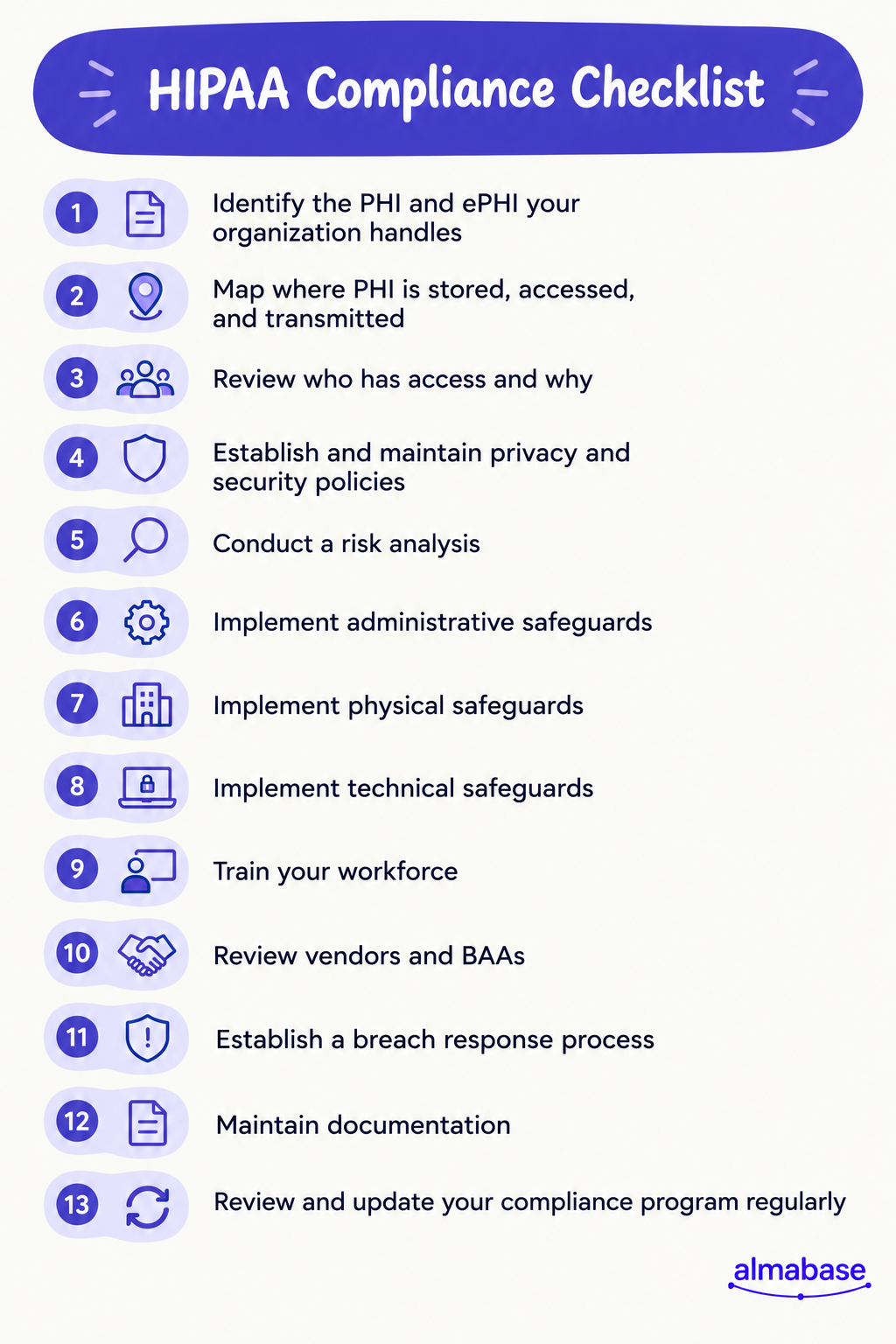
1. Know What Data You're Responsible For
This is the most fundamental step to get right before you can approach protecting the data: you need to know where it is and how your organization uses it. The best way to look for it would be to break this down into granular steps.
Ideally, this should include:
- Identifying the PHI and ePHI your organization handles
- Documenting where PHI is stored
- Identifying how PHI enters and leaves your organization
- Mapping the systems and workflows that use or transmit PHI
- Identifying employees, teams, and vendors that can access it
- Reviewing whether each person or system actually needs that access
For a healthcare foundation, this could mean looking closely at how information moves between the hospital, advancement team, CRM, fundraising platform, communication tools, and other systems.
2. Know Who Has Access and Why
Once you’re certain where the PHI is stored, and how it enters and leaves your systems, look at who can access it and deliberate on the access. Of course, trust plays a huge part in this process, and you probably trust your team to be responsible with handling this data.
However, access should be tied to a person's responsibilities. Someone working on donor communications may not need the same access as a member of a grateful patient team, for example. Consider access from this perspective.
Review whether your organization:
- Uses role-based access controls
- Requires appropriate authentication
- Removes access when employees change roles or leave
- Reviews permissions periodically
- Maintains records of system activity and access
- Limits access to the information needed for a person's role
Regular access reviews can also help catch permissions that made sense when they were created but no longer make sense today.
3. Let Your Policies Match How People Work
A HIPAA policy sitting in an internal folder or understood by only a few employees will only be so effective. Employees need to understand what the policies mean for the work they do every day.
Your organization should establish policies and procedures covering areas such as:
- How PHI can be used and disclosed
- The minimum necessary use of PHI
- Privacy and security incident reporting
- Employee responsibilities for protecting PHI
- Appropriate use of devices and systems
- Workforce training and security awareness
- Procedures for updating policies as technology and workflows change
Training should also reflect people's responsibilities. A fundraising officer, IT administrator, and volunteer who encounter health information in different ways may need different guidance. Consider conducting specific workshops and training to address these role-based differences.
4. Secure the Systems and Places Where PHI Lives
The HIPAA Security Rule organizes safeguards into three categories: administrative, physical, and technical.
Here's what to review in each area.
Administrative safeguards
Administrative safeguards focus on the policies, processes, and people responsible for protecting ePHI.
You must include:
- Conducting a security risk analysis
- Establishing security policies and procedures
- Assigning responsibility for security
- Training your workforce
- Establishing security incident procedures
- Creating contingency and disaster recovery plans
- Conducting periodic evaluations
HHS credits risk analysis as a foundational step in identifying and implementing appropriate safeguards. It also notes that organizations should take their own environment and circumstances into account rather than relying on a single compliance blueprint.
Physical safeguards
Physical safeguards protect the facilities, workstations, and devices where ePHI can be accessed.
Review whether your organization:
- Controls physical access to relevant facilities
- Has appropriate workstation security policies
- Protects devices that can access ePHI
- Controls the movement and disposal of electronic media
- Has procedures for handling devices that contain ePHI
Technical safeguards
Technical safeguards focus on the technology used to protect ePHI.
Depending on your environment and setup, this means:
- User identification and authentication
- Access controls
- Audit controls
- Data integrity protections
- Encryption
- Secure transmission
- Automatic logoff and session controls
The exact safeguards an organization needs will depend on its systems, risks, and environment. This is one reason the risk analysis should come before deciding which controls to implement.
5. Put Your Vendors Under the Same Microscope
Your organization can have strong internal controls and still introduce risk through a third-party vendor.
To minimize this risk, identify every vendor that creates, receives, maintains, or transmits PHI on your behalf. Then determine what information each vendor handles and what protections are in place.
Check that you:
- Identify vendors that handle PHI
- Determine whether a Business Associate Agreement (BAA) is required
- Review vendor security and privacy practices
- Understand how subcontractors handle PHI
- Establish procedures for reporting security incidents
- Review vendor relationships periodically
A BAA establishes permitted uses and disclosures of PHI and requires the business associate to implement appropriate safeguards. HHS also requires business associates to address certain obligations with their subcontractors.
This detail is particularly relevant when evaluating fundraising and engagement technology. A CRM, event platform, communication tool, or other system may interact with information that falls within your organization's HIPAA obligations, so its data practices should be part of your vendor review.
6. Be Ready If Something Goes Wrong
A compliance program is not complete without a plan for incidents. Your organization should have a clear process for identifying, reporting, investigating, and responding to potential breaches.
Make sure you can:
- Define what constitutes a potential breach
- Give employees a clear way to report incidents
- Identify who investigates and responds to incidents
- Establish an escalation process
- Document the incident and investigation
- Determine if notification is required
- Track corrective actions after an incident
Under the HIPAA Breach Notification Rule, covered entities and business associates have notification obligations following a breach of unsecured PHI.
Having these procedures in place before an incident occurs gives your team a defined process to follow if the need arises.
7. Prove That Your Program Works
A part of HIPAA compliance also means having evidence on hand of the work your organization has done.
Document the following:
- Risk assessments and analyses
- Policies and procedures
- Employee training records
- Business Associate Agreements
- Vendor reviews
- Incident reports
- Corrective actions
- Periodic evaluations and security reviews
It’s best to set up a regular cadence for reviewing these materials. Any new development, such as a new vendor, system, fundraising workflow, or a change in how information is shared introduces new risks that were not part of the previous assessment. Regular cadences will help make compliance part of your organization's rhythm and ensure you stay on top of these changes.
How Almabase Helps Healthcare Foundations Support HIPAA-Compliant Fundraising
Healthcare fundraising teams work with a wide range of information across donor engagement, events, giving, communications, and grateful patient programs. The technology used for these processes needs to support the organization's privacy and security requirements.
Almabase is designed to help healthcare foundations manage these fundraising workflows with security and HIPAA considerations built into the platform.
Keep sensitive information protected
Almabase provides controls designed to help healthcare organizations manage access to sensitive information, including permissions and audit trails. The platform also supports a Business Associate Agreement for organizations that require one.
Bring fundraising workflows together
Healthcare foundations can use Almabase to manage donor engagement, giving, events, communications, and other advancement workflows in one connected environment.
Keep your fundraising data connected
Almabase integrates with Raiser’s Edge NXT and other CRMs to help reduce manual data movement between platforms and keep donor and engagement information synchronized. Reducing unnecessary movement of information makes day-to-day data management easier to control.
Wrapping Up
HIPAA compliance is an ongoing process. As your organization adds new technology, works with new vendors, or changes how teams handle information, your compliance measures must adapt to remain airtight.
This means keeping an eye on how patient and donor information moves through fundraising workflows and making sure the right people, systems, and safeguards are in place.
Use this checklist as a starting point for reviewing your current practices, identifying gaps, and deciding where your team may need to take a closer look. Regular risk assessments, policy reviews, employee training, and vendor reviews can help keep your HIPAA program aligned with the way your organization actually works.
Looking for a fundraising platform built with healthcare organizations in mind?
See how Almabase supports healthcare fundraising →
FAQs About HIPAA Compliance
1. Which entities need to comply with HIPAA?
HIPAA applies to covered entities and business associates. Covered entities include qualifying healthcare providers, health plans, and healthcare clearinghouses. Business associates provide certain services to covered entities that involve PHI.
2. What is protected health information (PHI)?
PHI is individually identifiable health information that is created, received, maintained, or transmitted by a covered entity or business associate and is subject to HIPAA's protections.
3. What is the HIPAA Privacy Rule?
The Privacy Rule establishes standards for how covered entities may use and disclose PHI and gives individuals certain rights regarding their health information.
4. What is the HIPAA Security Rule?
The Security Rule establishes requirements for protecting electronic protected health information through administrative, physical, and technical safeguards.
5. What is the HIPAA Breach Notification Rule?
The Breach Notification Rule establishes requirements for notifying affected individuals, HHS, and, in certain cases the media following a breach of unsecured PHI.
6. What is the HIPAA Enforcement Rule?
The Enforcement Rule establishes procedures for investigations, hearings, penalties, and enforcement of the HIPAA Rules.
7. What is the Omnibus Rule?
The 2013 Omnibus Rule implemented changes to the HIPAA Privacy, Security, Enforcement, and Breach Notification Rules under the HITECH Act and strengthened requirements for business associates and their subcontractors.
8. Are all HIPAA rules necessary to stay compliant?
The HIPAA requirements that apply to an organization depend on its role and circumstances. Organizations should first determine whether they are a covered entity or business associate and then identify the specific requirements that apply to their activities.
.jpg)
HIPAA Compliance Checklist for Healthcare Organizations
Keep your HIPAA compliance program airtight and in shape with this checklist covering PHI, risk analysis, safeguards, vendors, training, and breach response.
Healthcare

Anwesha Kiran
September 30, 2026
12 minutes
Homecoming remains one of the best opportunities for schools and universities to bring their communities together, but getting alumni to participate takes more than just putting together a game or a reunion event on the calendar. Repeating too many of the same traditions year after year can make homecoming feel predictable, especially for alumni who have attended before.
Institutions need to think beyond the usual game-day activities and create experiences that give alumni a genuine reason to reconnect with friends, and participate. That might mean revisiting how students and alumni interact, using campus in unexpected ways, bringing back something forgotten, or creating experiences that make homecoming feel different from any other weekend on campus.
In this article, we have gathered fresh homecoming ideas that institutions can adapt and work into your 2026 events. Rather than the usual list of reunions, tailgates, and themed parties, these ideas focus mostly on creating experiences that encourage alumni participation and engagement and give them something new to look forward to.
Homecoming ideas for 2026
If your goal is to engage more alumni in the homecoming experience, the program is a good place to start. The activities you choose shape what people can do, who they can meet, and what they take away from the weekend. You can use them to build different parts of the homecoming program that offer opportunities to fit into and appeal to different groups. With that in mind, here are some homecoming ideas worth experimenting with in 2026 and beyond:
1. Open Campus
Once students graduate, much of the campus that was part of their everyday life becomes off-limits. Homecoming is a good time to change that for a day. You can have an open day for alumni that gives them access to parts of campus they would not normally be able to visit after graduation. It could be a chance to walk through the archives, visit a research lab, see a new facility, step backstage at the theater, or take a look at the spaces where students are working today.
You can also involve the departments and students who use these spaces. They can show alumni what has changed, explain what happens there now, and share some of the work they are doing. This gives alumni a chance to see a side of the institution that they would not experience during a regular homecoming visit.
For alumni who have been away for years, the day can be a simple way to see how much the institution has changed since they graduated. By doing so, homecoming becomes a way to reintroduce alumni to the institution and create new points of connection with it.
2. Alumni vs. Varsity Athletics
Homecoming already brings alumni, students, and the wider campus community together. You can use that crowd to put a little competition back into the weekend. Bring former athletes back to compete against the current varsity team in a friendly game or a shorter exhibition before the main homecoming event.

Former teammates get to play together again, current athletes get to meet the people who once represented the same team, and everyone watching gets to see two generations of the program in one place. You can add old team photographs, jerseys, or a brief recognition of former athletes from the game to bring some of that history into the day. To deepen the connection, include a panel discussion or Q&A session where alumni and current players can share stories, pass on advice, and talk about how the sport has evolved over the years.
It can also become a recurring part of homecoming. Over time, the alumni game could grow into something former athletes plan their returns around while giving current teams another way to connect with the people who came before them.
3. Then & Now: a guided nostalgia tour
Homecoming already brings back memories, so you can build on that with a “then and now” tour of campus. Put an old photograph of the campus next to what the same spot looks like today. Take them through a residence hall, classroom, dining area, student center, or favorite campus hangout and let alumni share what they remember about each place. These old photographs could also serve as excellent keepsakes/memorabilia for the nostalgia tour.
Current students can join the tour and add their side of the story. They can explain how the space is used today, what student life looks like now, and what has changed since the alumni were there, and alumni could chime in with how different the same space used to be. You could also collect a few alumni stories before homecoming and build them into the tour.
For alumni who cannot make it back, you can take the “then and now” experience online with old photographs, current images, short videos, and memories from their time on campus. It can also give them a glimpse of what they are missing at homecoming and encourage them to make the trip next year.
4. Let the class take over homecoming
Instead of giving homecoming a broad ’80s, ’90s, or 2000s theme, you can build the day around a specific graduating class and bring their version of homecoming back to campus.
Say it is the Class of 2005. Bring back the music, traditions, clubs, games, campus activities, and other details that defined homecoming for that class. You can even invite former student leaders to step back into their old roles for the day. The former RA can run a residence hall activity, the student body president can lead the welcome, and former club or organization leaders can bring their groups together again.

The class gets to help recreate the homecoming they remember, while current students get to see what campus life looked like for an earlier generation. It is a much more personal way to use nostalgia than simply putting a decade on the invitation.
5. The Homecoming house party
Bring the feel of a college house party into homecoming weekend. Pick a familiar campus space or a beloved dorm and turn it into a relaxed evening with music, food, games, and plenty of room to hang out.

You can have students and alumni add songs to the playlist, bring back a few favorite campus snacks, and set up games that people remember from their college days alongside newer ones that students enjoy today. It does not need a stage, speeches, or a packed schedule. The idea is to give people a place to relax, talk, laugh, and stay for a while.
It also gives homecoming a more informal side. Alumni can spend time with old friends, meet current students, and enjoy being back on campus without having to sit through another formal program. If people enjoy it, it can easily become one of those homecoming events everyone looks forward to. It also works really well as the event to wrap up the Homecoming weekend.
6. Homecoming game day
You can turn a part of homecoming into a friendly competition that students, alumni, faculty, and families can join. A cook-off, campus trivia, karaoke contest, three-legged race, mini talent show, or even a ridiculous relay can work, depending on what fits your campus.
The point is to keep the competitions light and easy to join. You can have people sign up as individuals or teams, mix students and alumni together, and keep small prizes for the winners. For trivia, questions can cover campus history, old traditions, sports, music, and things only long-time students would know.
It gives people something to do together instead of simply attending another event. Alumni who come back for the weekend can end up competing with current students, meeting people outside their own graduating class, and making some new memories along the way.
7. Tailgate with a twist
Tailgates are an oldie but a goodie, but with a little bit of thought, they can take on a more exciting shape.. You can keep the food, music, games, and pre-game buzz, but give each tailgate its own personality.
Take a step ahead and turn the usual tailgate into a friendly campus-wide competition. Let different schools, departments, student groups, or alumni chapters host their own setup and compete for the best food spread, best setup, best playlist, or most creative theme. You can have students and alumni vote throughout the day, with the scores displayed on a leaderboard for some real-time excitement. Announce the winners just before the game to end on a high note

You could also add a few unexpected stops around the tailgate area: a pop-up dessert bar featuring old campus favorites, a local food truck lineup, a small stage for student performers, or a “name that song” challenge that moves from the hits of past decades to today's music. The tailgate remains familiar, but there are enough new elements around it to make people want to walk around, take part, and stay longer.
8. Homecoming court reimagined
Homecoming court is one of those traditions that many institutions have kept for years, but it does not have to be limited to current students. You can open nominations to alumni and create a court that represents the institution's different generations.
Bring the finalists into the homecoming program and let the campus vote. You could have a recent graduate, a longtime alum, a former faculty member, a current student, or even a notable couple among the nominees. Give each finalist a short introduction that tells people what they have meant to the institution.
It turns a familiar homecoming tradition into a chance to recognize people who have been part of the institution at different points in its history. It also gives alumni a reason to follow the event, nominate someone they know, and take part in the celebration even if they are not attending a reunion.
9. Made here
For your upcoming homecoming, you can celebrate the institution’s notable achievements over the years. It could include the people who studied there, their ideas, businesses, research, art, traditions, and communities that began on campus and grew into something bigger.
You can carry the theme through the entire weekend. Put student and alumni work on display, bring back performances by former students, feature businesses founded by graduates, or ask different departments to share projects that began at the institution and have since gone elsewhere. You could also have students showcase what they are working on now and place those projects alongside examples from earlier years.

It gives alumni a chance to see the impact of their institution today and find new reasons to stay connected to it. They can discover programs, projects, and people they want to support, follow, or get involved with long after homecoming.
10. The next chapter
Homecoming can be an excellent chance to show alumni what's next. Instead of focusing only on the institution they remember, you can use the weekend to introduce them to the people, programs, and plans that will shape its future.
You can give alumni an early look at a new academic program, a campus expansion, a research project, a student venture, or a new initiative that is still taking shape. Invite the people behind these projects to share what they are working toward and what they hope to accomplish. Alumni may find areas that connect with their own experience or expertise and want to stay involved. This also lends itself beautifully to showing the impact first and then making an ask, in case fundraising is part of your Homecoming.
You can also bring current students into the conversation. Let them talk about what they are building, what they want to do after graduation, and what they hope to see from their institution in the years ahead. Alumni can respond with advice, introductions, ideas, or support based on their own experience.
This gives alumni a reason to keep paying attention after homecoming. They are not only coming back to see what they once knew; they are getting a look at what they may want to be part of next.
At the end of the day, homecoming is about bringing people back to a place they still care about. The traditions give them a reason to return, but the way you bring those traditions to life can make each year feel different. A little creativity can go a long way in making alumni want to come back, take part, and stay connected.
Carrying the engagement beyond homecoming
A homecoming can create a lot of alumni activity in a short period and open the door to regular alumni involvement. Homecoming gives you a useful snapshot of what alumni care about. The key is to identify and use the interactions and interests you learn about during homecoming to shape future outreach. When you map the follow-up to what your alumni paid attention to when they were on campus, over time, these can turn a once-a-year homecoming visit into an ongoing relationship with the institution.
A few ways to build on the momentum:
- Send relevant follow-ups- if someone attended a student mentoring session, invite them to a future mentoring opportunity. If they joined a chapter event, keep them informed about what that chapter is doing.
- Share the highlights- send photos, videos, student stories, or other content from the weekend while the event is still fresh.
- Invite them to something specific- use what you learned from homecoming to recommend the next event, volunteer opportunity, or program that may interest them.
- Stay in touch with new connections- if alumni met classmates, students, faculty, or other alumni during the weekend, give them ways to continue those conversations.
How can Almabase help
A successful homecoming represents a means to a beginning. It gives you a chance to learn more about what brings alumni back and what they want from their relationship with the institution.
But when registration details, attendance records, event participation, and follow-up information are spread across different spreadsheets or must be gathered manually, it can be difficult to get a clear picture of alumni engagement. Almabase brings this information together so your team can manage the homecoming program and use what you learn from it to plan future engagement. Your team can use Almabase to build the program, promote it to the right alumni, manage registrations and attendance, and keep that activity connected to each alum’s engagement history.
- Build and manage your event in one place- create the homecoming event, add individual activities, set registration options, and manage attendee information.
- Target your outreach- use alumni segments to promote different parts of the program to the audiences they are most relevant to.
- Keep track of engagement- registration and attendance data give your team a record of how individual alumni participated, not just how many people came.
- Connect event activity with alumni profiles- participation becomes part of an alum’s engagement history, giving your team more context for future outreach.
- Use that data across your engagement strategy- homecoming activity can help inform future event invitations, volunteer opportunities, mentoring programs, chapter engagement, and other outreach.
Finishing up
Homecoming is fertile ground for trying something new and learning what brings your community together. A change to the program this year could become a tradition worth keeping or finding out what alumni respond to most. Either way, each homecoming gives you another chance to make the experience more relevant to the people you want to stay connected with. We hope our ideas have inspired you to use the weekend to try something new and find ways to keep them involved throughout the year.
Want to see how Almabase can help you manage homecoming and turn event participation into ongoing alumni engagement?
Book a personalized demo today and see what you can do with Almabase.

Homecoming ideas to inspire alumni engagement in 2026
Give your next homecoming event a fresh spin with creative ideas designed to get alumni involved, reconnecting, and excited to keep coming back each year.
Events
Sharada Koti
September 17, 2026
12 minutes
Blackbaud recently announced that support for Raiser’s Edge NXT’s database view and related functionality will end on September 15, 2027, affecting several Blackbaud products. These include Blackbaud Online Express and Blackbaud NetCommunity (BBNC). For advancement teams that have spent years building forms, pages, workflows, and other processes around the platform, this means choosing and migrating to a new platform. The prospect can feel like a lot to take on, especially if it wasn't something you'd anticipated.
If you're looking for an alternative, Almabase can help you replace the functionality you currently rely on across these products. We've already covered why teams might be thinking of a move off BBNC and how the main alternatives compare. In this article, we’ll be focusing on what happens once you've made that decision: what the migration process looks like, what your team can expect along the way, and how Almabase approaches the move.
In case you’re evaluating how Almabase stacks up against BBNC, check out our comparison blog here.
There’s also another question that comes up around a platform migration: How much is this going to cost?
This question extends beyond the immediate, visible technical costs. In fact, the technical side of the move might just be the simplest to figure out. It’s the broader, more abstract elements like shifting scopes, changing requirements, or even figuring out the right set of requirements in the first place that could end up costing the most amount of money and time, if not approached thoughtfully.
That's why we want to walk you through the Assisted Fast Pass Migration process upfront: what happens at each stage, what your team is responsible for, what our migration team handles, and where costs may come into the picture. We hope to give you a clear idea of what the move to Almabase will look like before you get started, so there are fewer surprises along the way.
Why transparency matters during a migration
A migration project always begins with an agreed-upon plan. But it’s also very likely that, a few weeks in, you discover a form that needs some additional customization or a request that seemed straightforward seems to fall outside the original scope, on second thought. These are perfectly reasonable hiccups during the migration, but if work is already underway, it could seem harder to understand what you're paying for, and even harder to plan around the rest of the project.
Clear expectations are at the heart of our migration approach, starting with total transparency around what extra requirements cost. With Almabase’s Assisted Fast Pass Migration, each stage gives you a chance to understand what's being proposed, what falls within the standard migration, and where something would require additional work.
Basically, you shouldn't find out about an extra requirement after the work has already been done. Your approval and sign-off comes first. The five steps in the migration process are built around this intention. Let’s get into them.
1. Kickoff: Getting the project off on the right foot
The migration process starts with a kickoff between your team, a dedicated CSM, and an implementation specialist. This is where we get the groundwork in place. This is usually access to your current site, your branding assets, and the dates your team needs to work around.
Another important step here is understanding your calendar and priorities. Your Giving Day, reunion, fiscal year-end, or another major event may determine what needs to happen first and we would be building the migration calendar around it. So, the migration sequence might look a little different for each institution, as each gets to choose which product goes first.
The kickoff is also a chance to flag anything unusual about your current NetCommunity setup.
After years on a platform, it's normal for your setup to have accumulated a few workarounds, custom configurations, or integrations that made sense when they were created. We don't need to solve all of those questions in the first meeting, but we do need to know about them.
That way, we can account for them during the next stage: the inventory. 🤗
Your team mainly needs to provide:
- Key dates and deadlines
- Relevant branding assets
- Access to your existing NetCommunity site
- Any known custom configurations, integrations, or unusual workflows
- From there, you can let us take on the heavy lifting.
Your dedicated CSM and implementation specialist work with you throughout the migration, while your team focuses on the decisions and approvals. A migration shouldn't require your advancement team to take on managing a project full time on top of everything else they’re already handling.
Your data doesn't have to wait for the build
Your data migration is handled alongside the rest of the process. Almabase's bi-directional TrueSync integration connects with Raiser's Edge NXT and supports two-way syncing for configured entities and fields, including constituent, event, and gift data.
Admins can also decide which fields update automatically and which should be reviewed before they're pushed or pulled between systems.
That means your team doesn't have to wait until every page and workflow decision has been finalized before thinking about what happens to your data. The data side of the transition can move forward alongside the rest of the migration, with real time decisions being made.
2. Discovery and inventory: weeks one and two
Once kickoff is complete, your implementation specialist carefully starts building a complete inventory of what's currently running on NetCommunity: pages, forms, events, programs, memberships, and other key components of your site.
This process is useful in its own right, especially when taken on by someone external. After years on a platform, it's easy for a site to accumulate things that no one thinks about anymore, simply because they’re too involved in the process. The inventory gives you one place to see what's actually there, anything you might’ve forgotten about, and to make decisions about what needs to move vs what can be left behind.
Probably the most effective part of this is that it's a shared inventory that you can review alongside your specialist. If something looks outdated, doesn't need to move, or needs a closer look, you can flag it before it moves to the new product.
The inventory can surface things like:
- Duplicate or unused event pages
- Old forms or pages that are still live
- Site elements that don't need to be carried into Almabase
- Custom fields and configurations that don’t make sense on the new platform
This idea is to document your NetCommunity site so well that both teams end up on the same picture of what exists and what needs to happen next. The Almabase team handles the actual inventory work, and all you need to do is review the inventory and flag anything that should be changed, removed, or investigated.
3. Sign-off: deciding what moves forward
At this stage, the migration project starts taking on a more defined shape as you decide what you need to bring into Almabase. You and your implementation specialist review the inventory, decide what carries forward, and establish what the finished version should look like.
For each item being migrated, the team, along with you, defines the acceptance criteria before the building begins. If your existing alumni directory has eight fields and three filters, for example, those requirements can be documented as part of the scope. By the end of this discussion, everyone has arrived at the same definition of what needs to be delivered.
This is also where you’ll be able to clearly separate standard migration work from anything that requires additional effort.
If something falls outside the standard scope, you'll know before the work begins:
- What the additional work involves
- What's included and what's excluded
- The estimated effort
- The associated cost
You won’t have to decipher this from the invoice later on, because the work only moves forward once you’ve signed off on the scope.
This is exactly why your input here matters most. The Almabase team handles the building, but it’s you and your team deciding what is important enough to carry forward and what “done” needs to look like, within the standard process or with additional effort layered on.
4. Build and launch: 30 days for each product
Our team takes up building only once you’ve greenlit the scope. Each product gets its own dedicated 30-day track, with the order of products taken up built around your events and fiscal calendar.
This is to accommodate your calendar: giving days, reunions, Homecoming, we’ll build that product first so you’re ready in time for go-live day. If your immediate priority is your broader alumni site, we might begin with building that instead. The point is, even at this pace, you’re not forced to adopt a one-size-fits-all solution. Your implementation team works with you to determine what needs to come first.
The build itself happens on your Almabase pages, so you can review as it gets built while also familiarizing yourself with the new platform.
The timeline typically looks like this:
- 30-day build track: Each product moves through its own focused build.
- Weekly working session: Your team meets with the implementation team to review progress, provide input, and make decisions.
- Training as you go: Your team gets hands-on experience with the platform during the build, rather than waiting until everything is finished to start learning it.
- First launch: The fastest migrations can have their first product live around 45 days from kickoff, depending on the scope and sequencing of your project.
Having the scope agreed upon shows up in smoothness at this point: you can expect fewer decisions to make from scratch during this stage. Your team knows what's being built, your implementation specialist knows what they're working toward, and everything can move as planned, on track.
5. Cutover: moving from NetCommunity to Almabase
As you get closer to launch, the focus shifts from building to making the transition itself as smooth as possible.
The most important part of that is making sure people can still find the things they've been using. Your team receives a redirect map that pairs each carried-forward NetCommunity URL with its new Almabase destination. You'll also want to review where those old links appear outside NetCommunity: your main institutional website, email templates, QR codes, printed materials, and any other places where an old URL may still be in circulation.
The redirect map gives you a clear list of what needs to change and no one has to discover old links one by one after launch.
Before each product goes live, your team gets to review it thoroughly and explicitly approve the launch.
The aim, with these five steps, is to get your Almabase programs ready before your NetCommunity access ends, so the transition remains smooth and doesn't become a last-minute scramble.
What happens when something doesn't fit the standard scope?
Not everything that comes up during a migration falls neatly into the original plan. But there's also an important conversation to be had: what counts as additional scope and what is a limitation in the platform itself?
If something requires work beyond the standard migration scope, that's identified and quoted before the work begins. You can then decide whether you want to take it on.
But if there’s a requirement you have that Almabase cannot support yet, we’ll be fully transparent with you. Essentially, you haven’t asked for too much, we’re just not there yet. Depending on what you need, the team can look at a workaround or determine how the functionality could be addressed after launch.
This conversation is also one of the reasons the earlier stages matter. The shared inventory, defined acceptance criteria, and upfront scoping give everyone a common reference point throughout the project.
That's really the principle behind the entire migration process. You're not expected to know every detail of what needs to happen before the project starts. The process itself is designed to show you those details early, give your team a chance to make the calls that matter, and keep the build moving while minimizing unexpected, last-minute surprises.
Ready to make the move?
A BBNC migration may not have been on your roadmap, but that also doesn't mean it has to become a project that takes over your team's calendar.
With a clear process, an agreed scope, and the right support, you can move the parts of NetCommunity that matter to your team and work for your institution without having to figure everything out as you go. The Almabase team handles the build and migration work, while your team stays in complete control of the decisions, priorities, and final approvals.
And because the scope and any additional costs are addressed before the work happens, you can go into the migration knowing what to expect.
If you're planning your move away from BBNC, let's talk about what it could look like for your institution.
Talk to the Almabase team about your BBNC migration →

Moving from BBNC to Almabase: The Assisted Fast Pass Migration
Blackbaud is sunsetting support for Raiser’s Edge NXT’s database view and related functionality in September 2027. Learn how Almabase replaces your current functionality and how our Assisted Fast Pass Migration makes for a smooth switch without disrupting your campaigns or operations.
Events
Anwesha Kiran
September 10, 2026
12 minutes
See how leading institutions put these ideas into action